Category: Marketing

Marketing

  • Landing Page No Website: 5 Minutes to Start Earning

    Landing Page No Website: 5 Minutes to Start Earning

    Welcome, money makers! How about powering your online business with one landing page without a website? Sprint creation of sleek & plain pages that generate higher revenues from ads. We’ll go through Google Sites, WordPress, Blogger, and Wix platforms.

    Too long? Ask AI to summarize

    ChatGPTPerplexityClaude

    Why should you create a landing page without a website?

    You need to create a landing page without a website for these reasons:

    1. Focus readers on one topic, one message or one advertising link
    2. Direct traffic precisely to this page.
    3. Earn revenues from ads that are not allowed on Facebook or other networks.

    Let’s unwrap the last point a bit. You probably know how to generate Facebook traffic and earn from sponsored content. However, Meta doesn’t allow putting ad links in posts or stories. Can you still monetize traffic from social media? Of course! You will need a landing page where ads are allowed! It will only take 10 to 30 minutes to make one instead of creating and optimizing a huge website.

    Finally, you’ll be able to send Facebook traffic to this page and earn from those users who click on ads. Adsterra offers high CPM rates for social traffic, therefore, you can expand your monetization strategy!

    GAIN MORE WITH LESS EFFORT

    How do I make money with one page only?

    Here’s the formula for how to make money with a landing page without a website:

    • Register on Adsterra and create a Direct Link (aka Smartlink). It’s recommended to allow all advertising types to boost CPM rates.
    • Place this Link on a landing page as any other URL: add to texts, images, buttons, or else.

    Social media can block complex URLs with ads or estimate them as spam. Here’s why many publishers resort to URL shorteners.

    • Start posting on Facebook, urging users to visit the page.
    • Users coming from Facebook will click the Link and watch ads.
    • You’ll get paid for views and conversions.

    Now, let’s learn how to easily create a page for placing advertising codes without making a multi-page website.


    How do I make money with one page only?

    Landing pages in Google Sites

    1. Log in to start

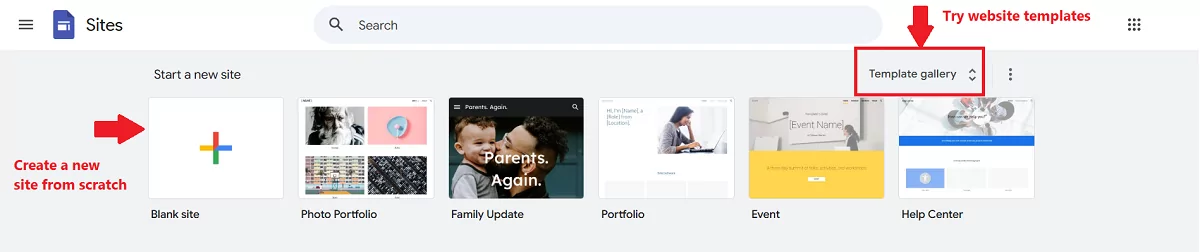
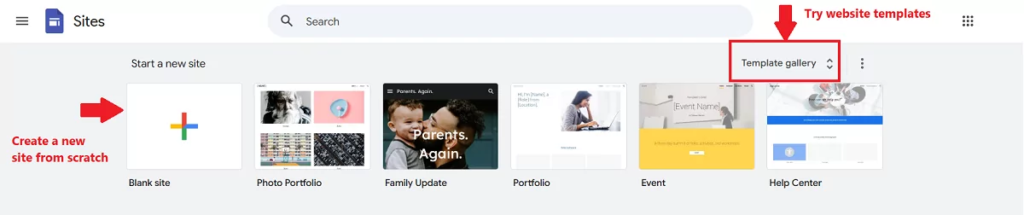
    2. Choose a template or create from scratch

    • Click the “+” button to create a new site from scratch.
    • Or navigate the Gallery and select a clean, minimal template.
    ways-to-create-a-new-google-site

    3. Add necessary sections or blocks

    Minimal pages work best. If you don’t plan to promote an online course or sell something, a couple of blocks with content are enough. In our example, we’ll work with a Photo Portfolio template.
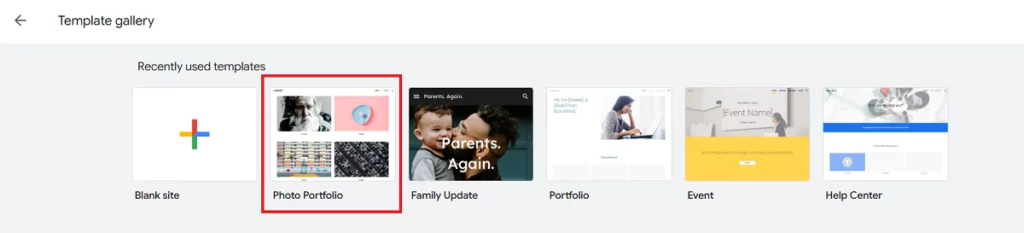
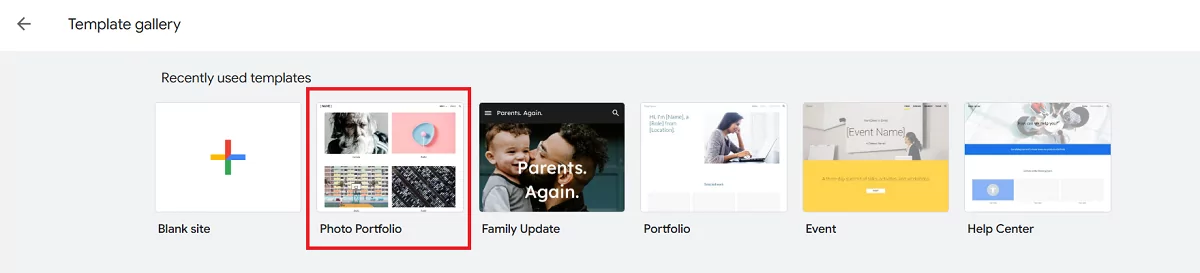
    google-site-templates
    • Use image blocks to insert compelling visuals that will make users click
    • Add descriptions that prompt high interest
    • Include buttons with clear calls to actions depending on what you offer the audience (“Get Now,” “Watch Now,” “Download for FREE”)
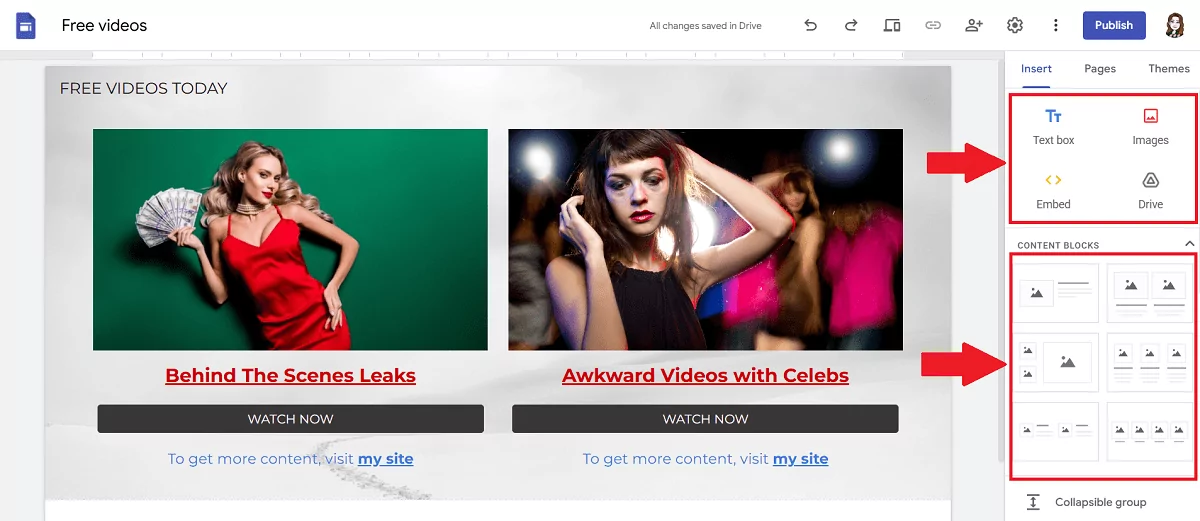
    blocks-and-sections-google-sites
    • Distribute Direct Links to get more clicks:

    In the example below, a publisher creates a landing page for monetization.
    *We were asked to replace real covers with stock photos to depersonalize this page.
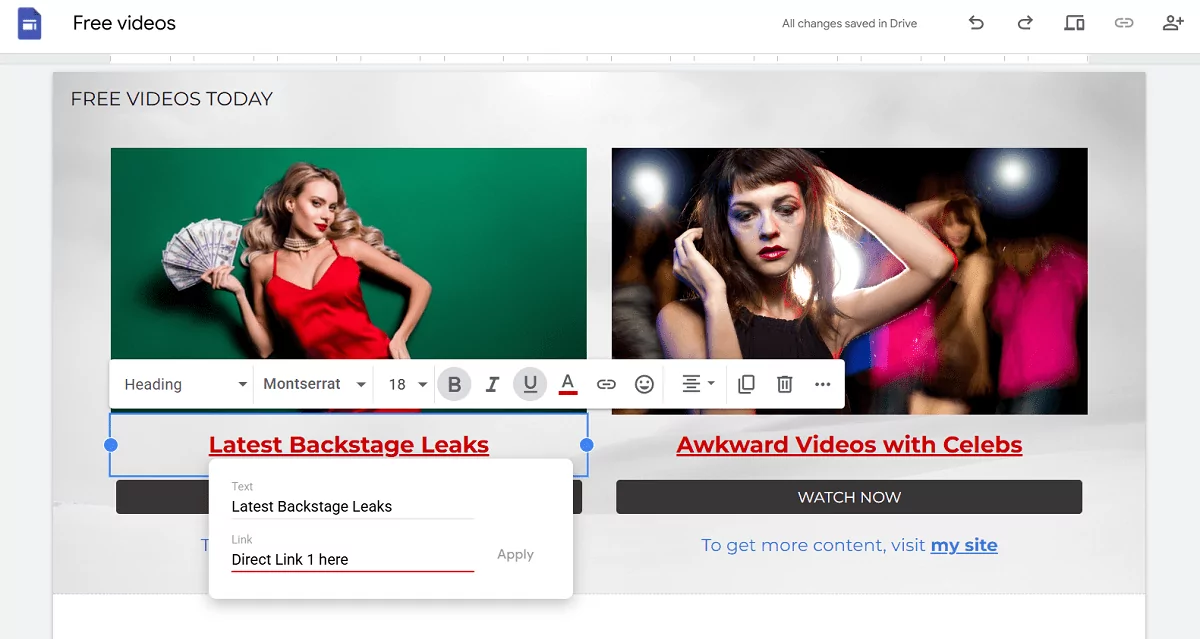
    attaching-direct-links
    • Direct Links are attached to images while the WATCH NOW buttons lead to the content.
    • Descriptions can also be converted into clickable texts.
    • The publisher also provided an option to visit their multi-page site.

    4. Preview and publish your landing page

    From the top bar, click the Preview icon. Click between desktop and mobile previews and make sure content looks the way you need it.

    preview-google-sites
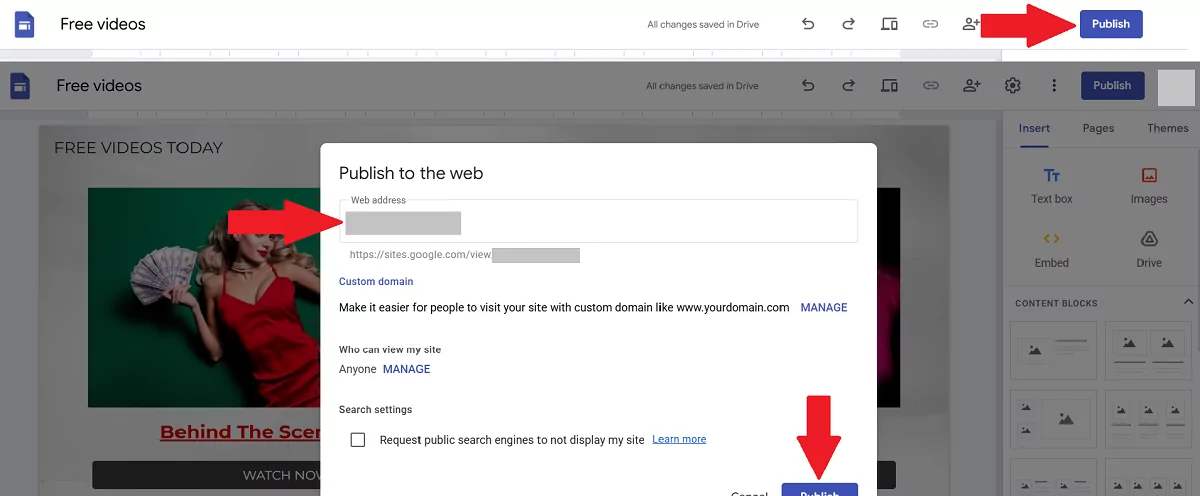
    • Choose a custom URL (e.g., sites.google.com/view/yourlandingpage).
    • Make the page live by clicking the Publish button
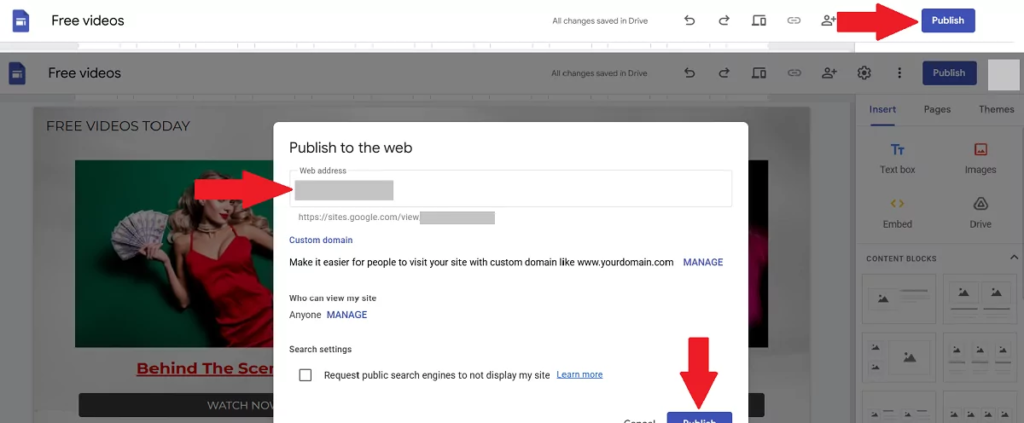
    publish-google-sites

    GET DIRECT LINK

    We’ve got a powerful guide to launching sites based on Google platform, just in case you want to pursue your monetization goals further.


    WordPress landing pages with no website

    1. Register with WordPress.com

    • Go to wordpress.com and click Get Started
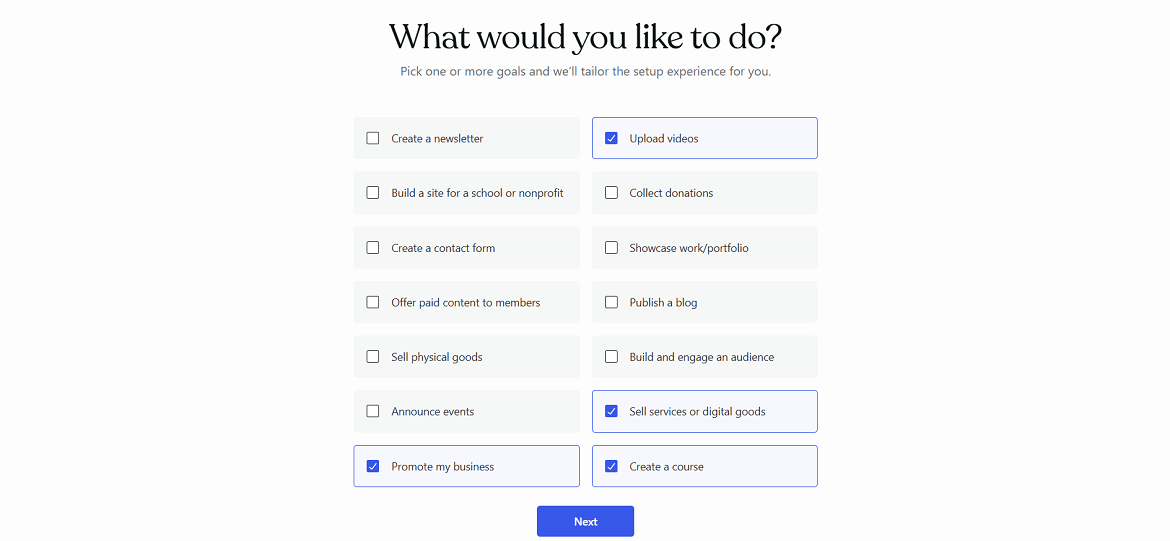
    • Follow simple steps: choose the purpose(s) of your content, pick a theme and its colors
    • Register with your email or Google account
    • Decide on a domain name (you can get a paid domain name or select a free type “______.wordpress.com”)
    • Finally, choose your WP plan (we picked FREE)
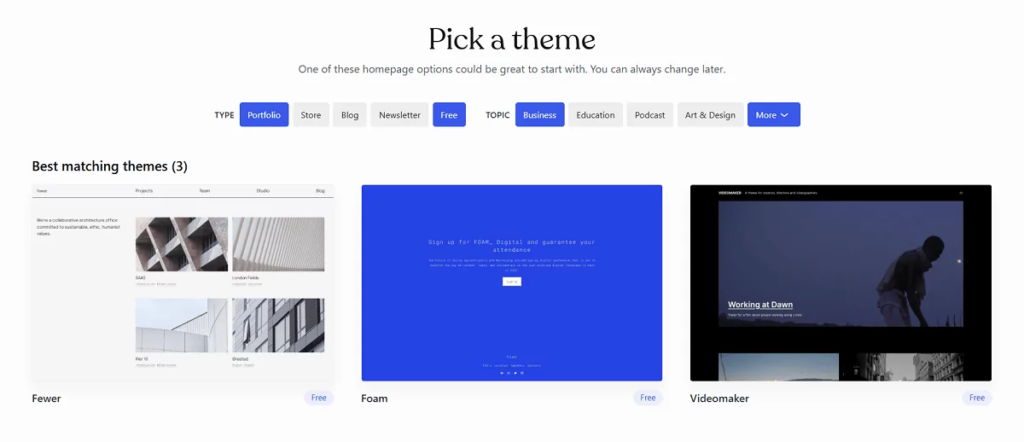
    wordpress-site-setup-1
    Click on images to check all steps

    2. Create a WordPress landing page

    • Sign in to your WP account (if you registered with Google, WP will email a one-time entrance link every time you sign in)
    • If you want to change the theme, click Appearance → Themes → and find the most suitable one (tip: use the Free filter to exclude paid themes)
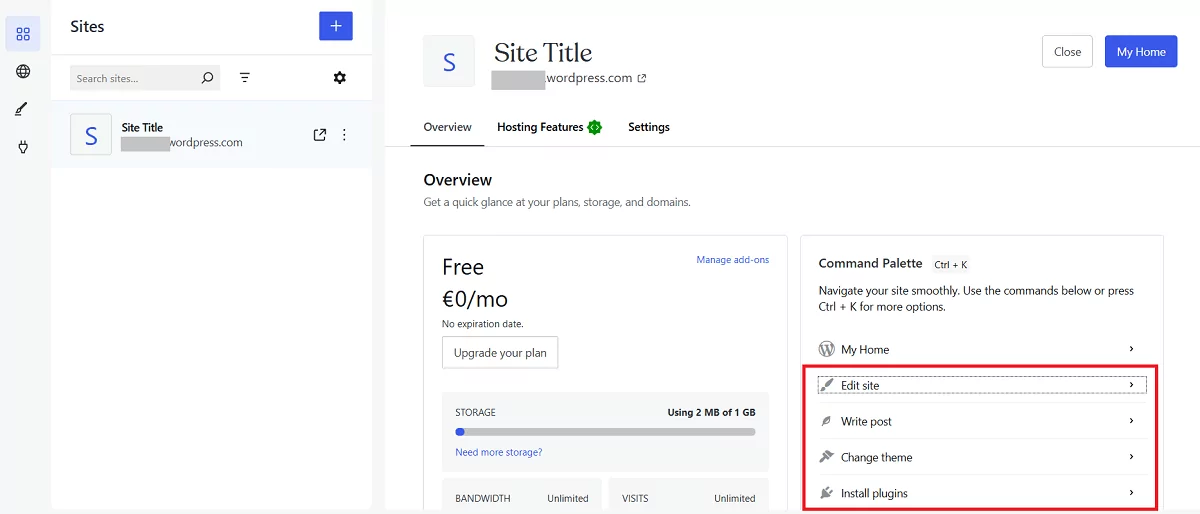
    • Select Edit Site from the Quick Links section
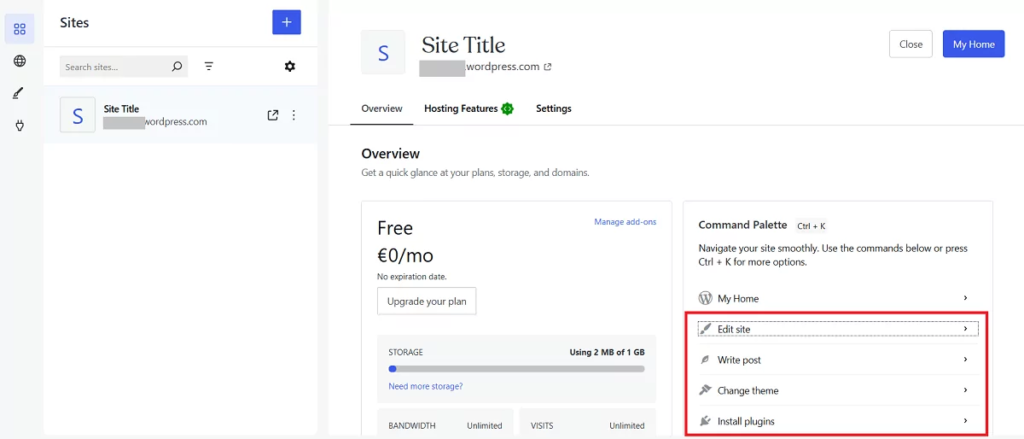
    quick-links

    3. Create content

    • Replace the placeholder title with yours (e.g., “Unlock Exclusive Benefits” or “Limited Access to Free Videos”).
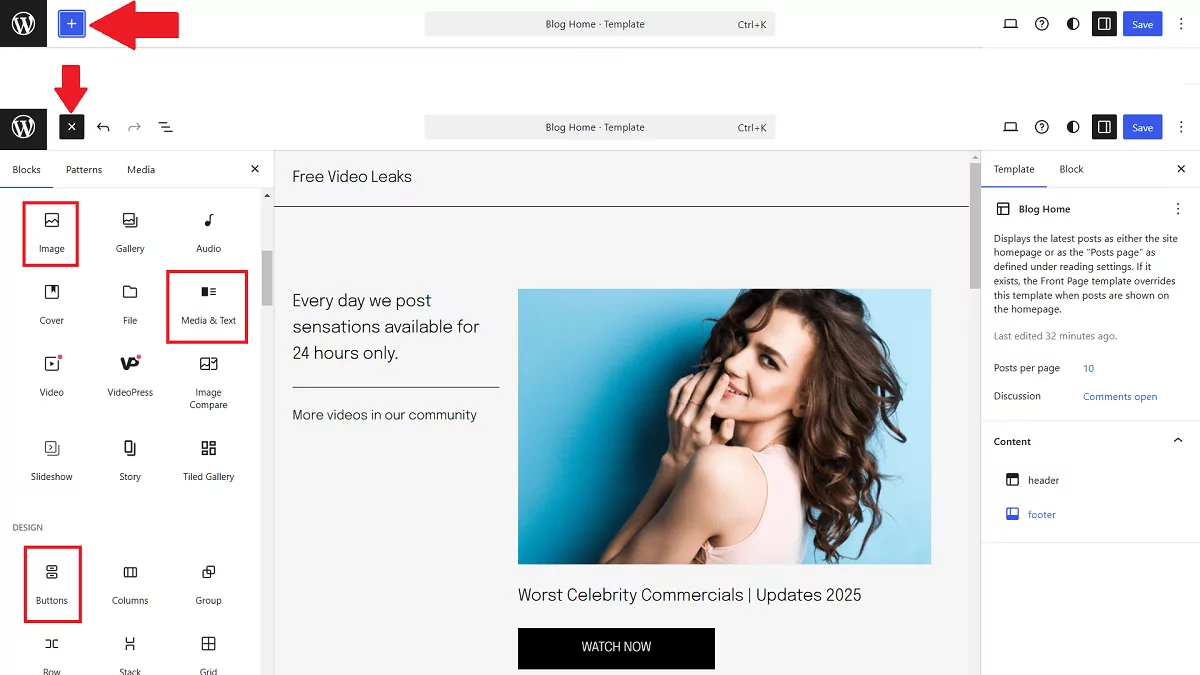
    • Use the “+” icon in the top bar to add content blocks
    • Add images and descriptions
    • Add CTA buttons or texts with links to the main content
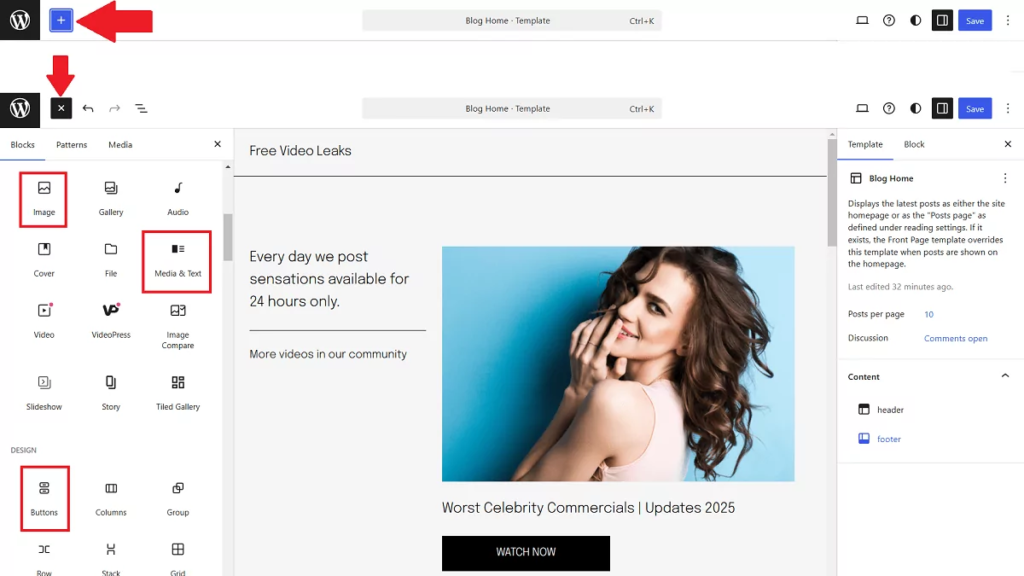
    blocks-wordpress-min

    4. Include Direct Links

    Place the Direct Link you took from Adsterra to noticeable content elements: headlines, images, buttons. For instance, to attach a link to a piece of text, select this text, hit the 🔗 icon, and paste the link.
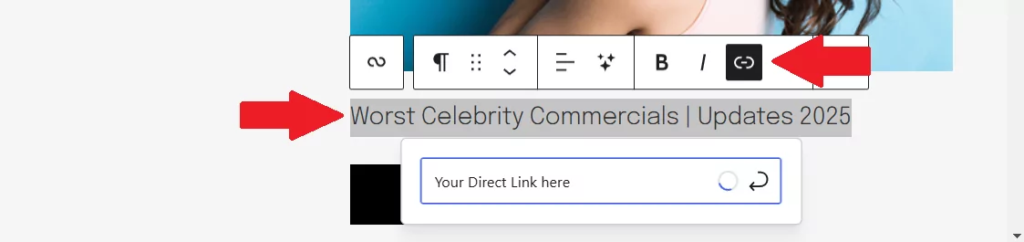

    add-links-to-wordpress-posts

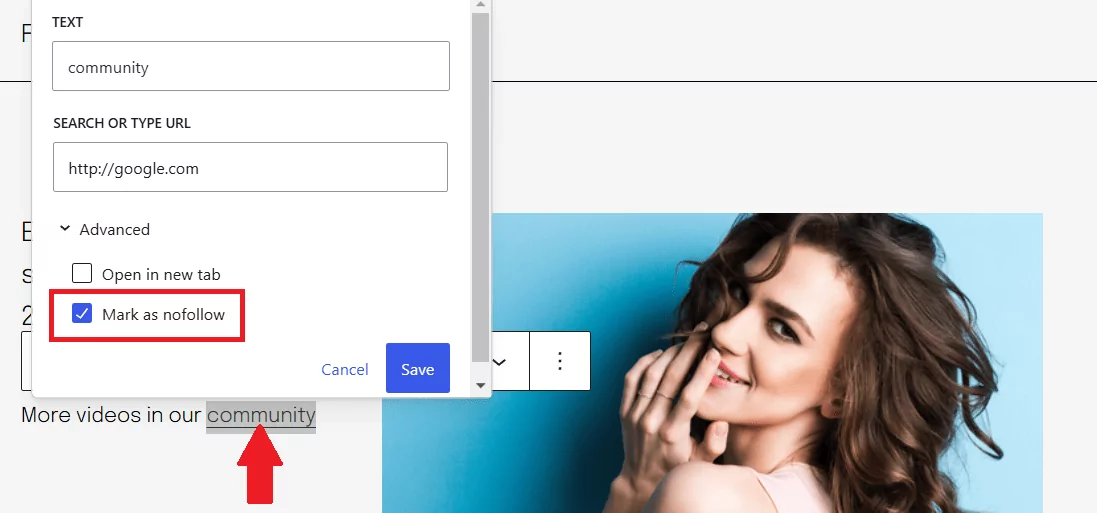
    Put the no-follow attribute to prevent robots from following these URLs.
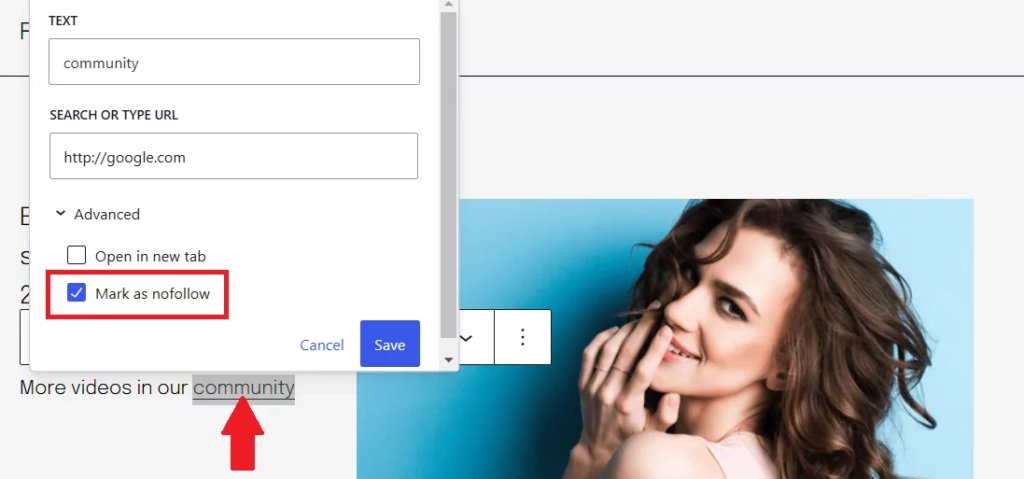
    no-follow-links-wordpress

    5. Preview and publish the page

    • After you finish the design, hit the preview icon and check how the page looks on desktop and mobile devices. Then click the Save button.
    • Test all links and forms to ensure functionality.

    preview-wp

    Finally, click the Launch Site button.

    Extra tips for WordPress landings without a website:

    1. When you create a mini-site or one-page site, remove unnecessary content. Open Settings → Writing and choose Pages for Post Types.
    2. Open Settings → Reading and pick Static for your homepage.

    Landing pages on Blogger

    Blogger is mainly used for building multipage sites and blogs. But you still can develop a minimal and fast landing page here. You will need to create a blog first. All landing pages will appear inside this blog like posts with unique URLs.
    Example: “https://yourblog./blogspot.com/2025/02/free-videostoday.html”

    Step 1: Log in and create a new post

    • Go to Blogger and choose CREATE YOUR BLOG
    • Log in with your Google account.
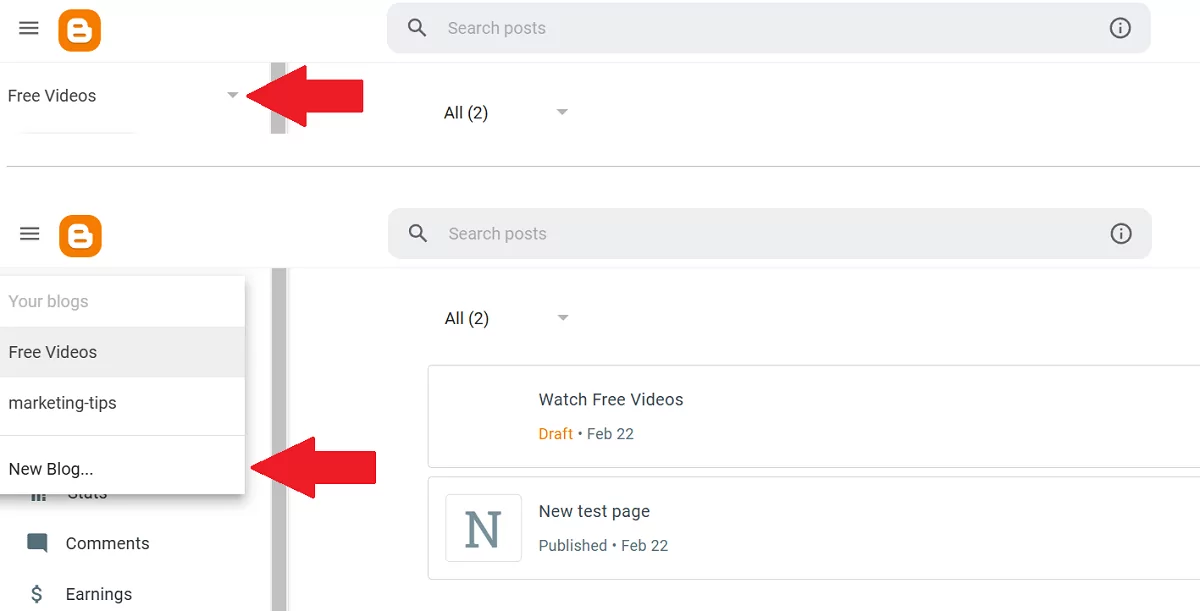
    • Click the arrow-down icon and pick New Blog
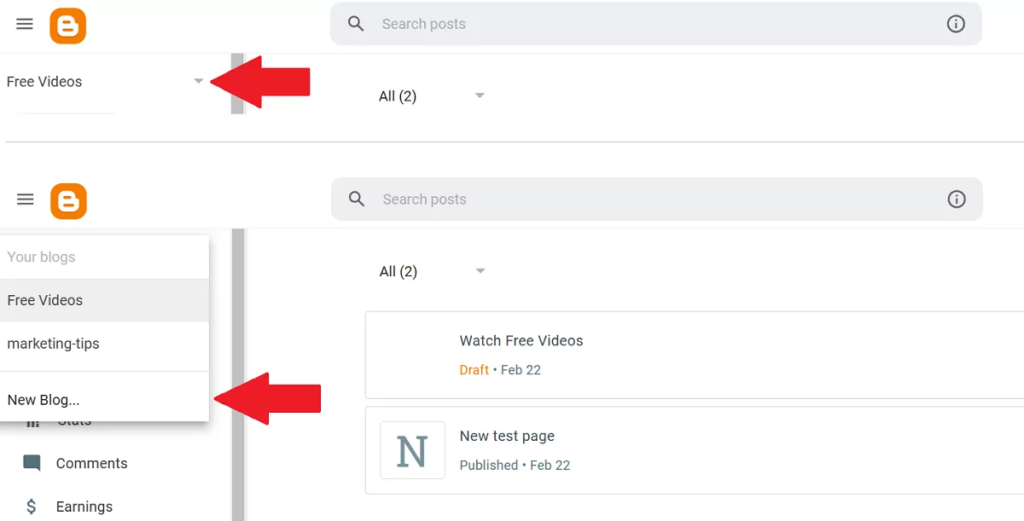
    add-new-blog-blogger
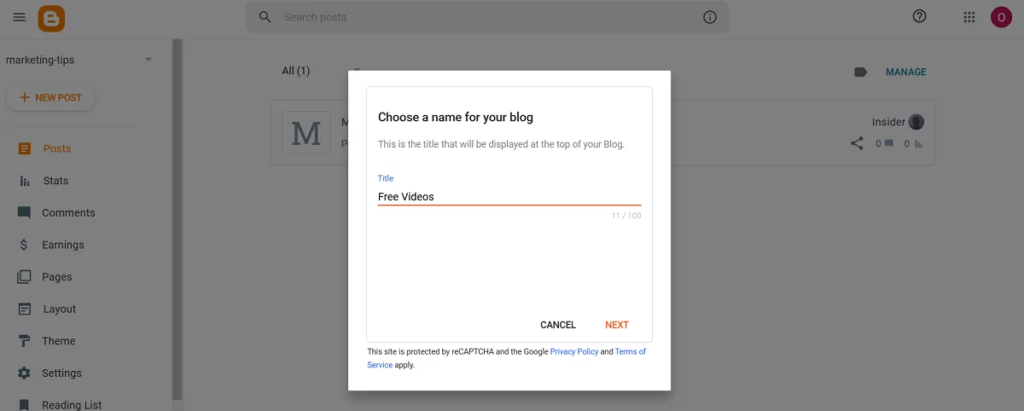
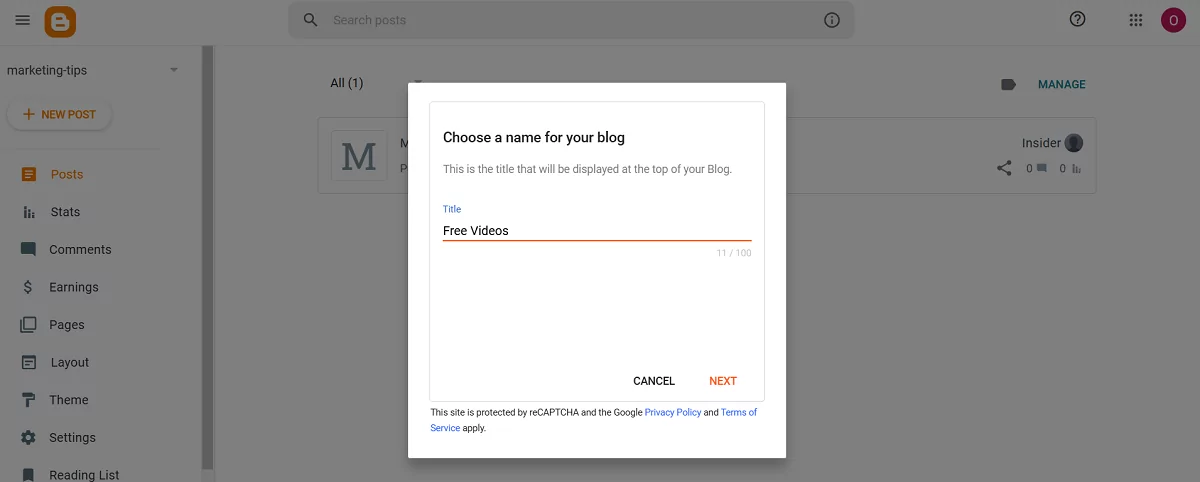
    • Enter the blog’s name
    name-site-blogger
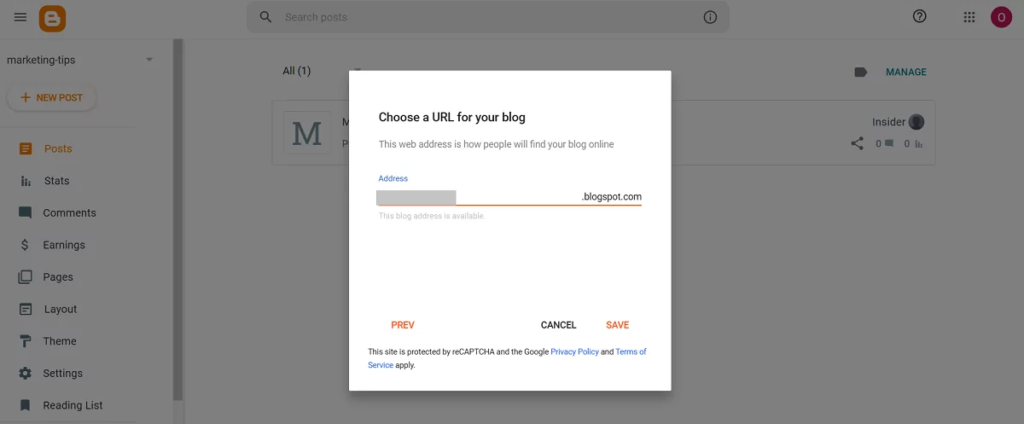
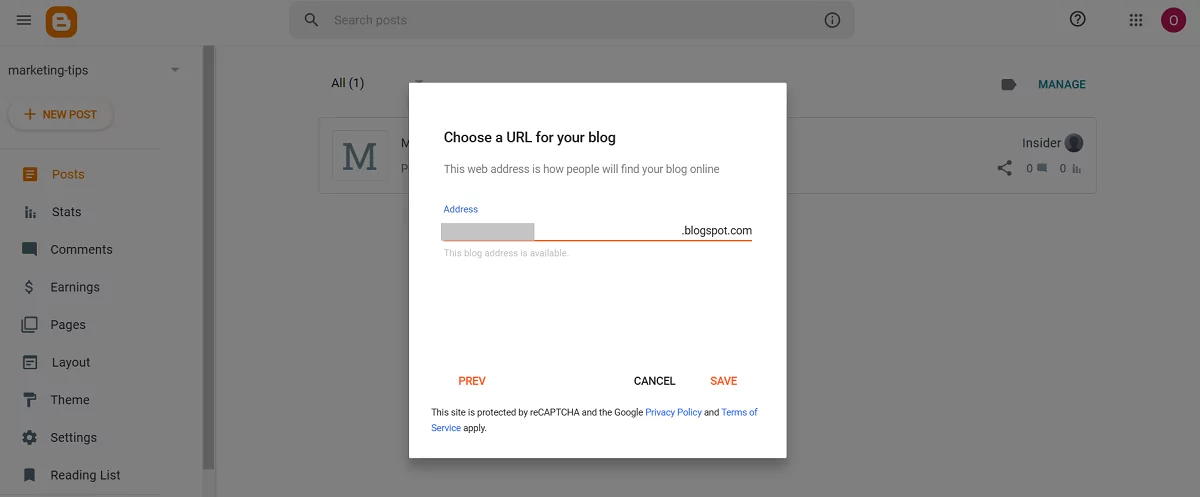
    • Enter the blog’s URL
    url-site-blogger
    • Click Save.

    2. Add main content

    • Click New Post to create a landing page.
    • Add images using the Image icon. To make an image clickable, select it and hit the link icon.

    add-images-to-blogger-posts
    • Add headlines and descriptions needed
    • Include spacers and dividers to make the content look neat.

    3. Include necessary links

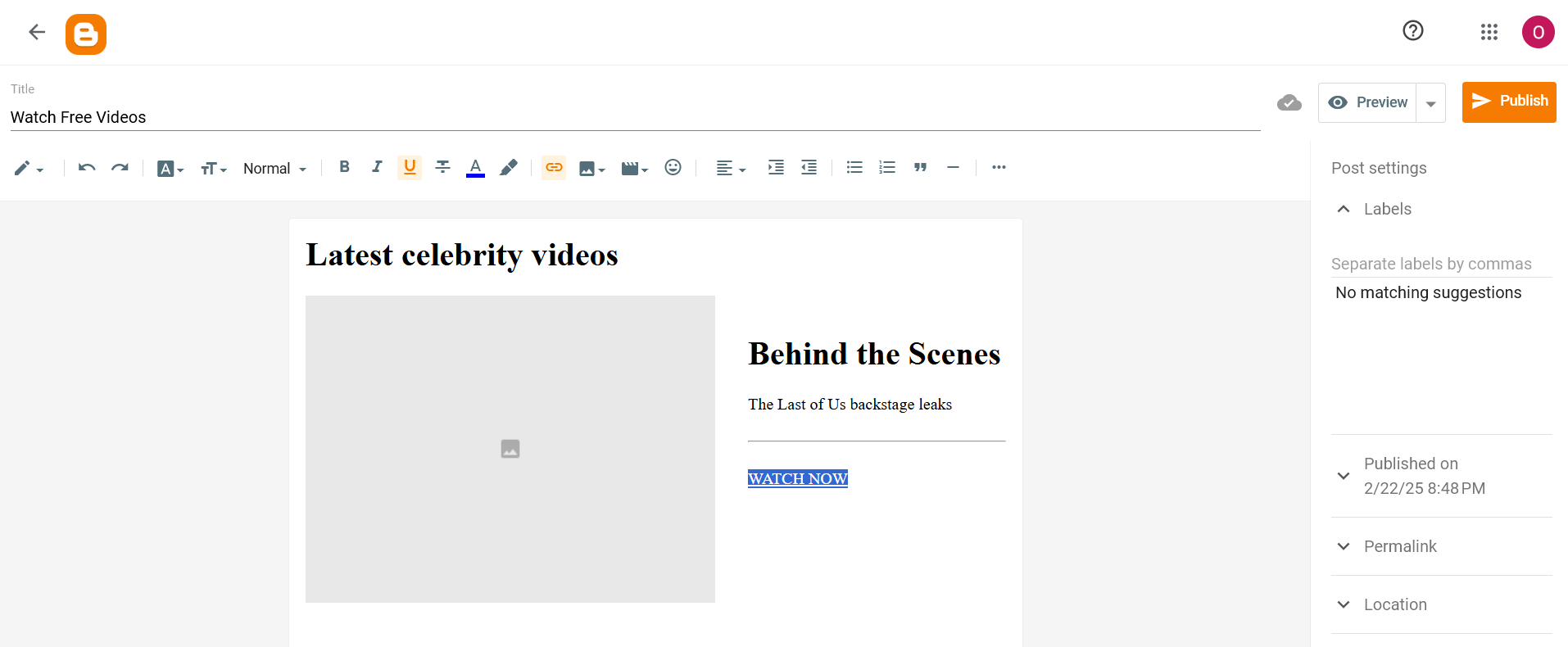
    From the Editor dashboard, you can attach a URL to any element: images or texts. You can’t create buttons with this set of tools, so use simple text blocks and attach links. Select a piece of text and hit the 🔗 icon.
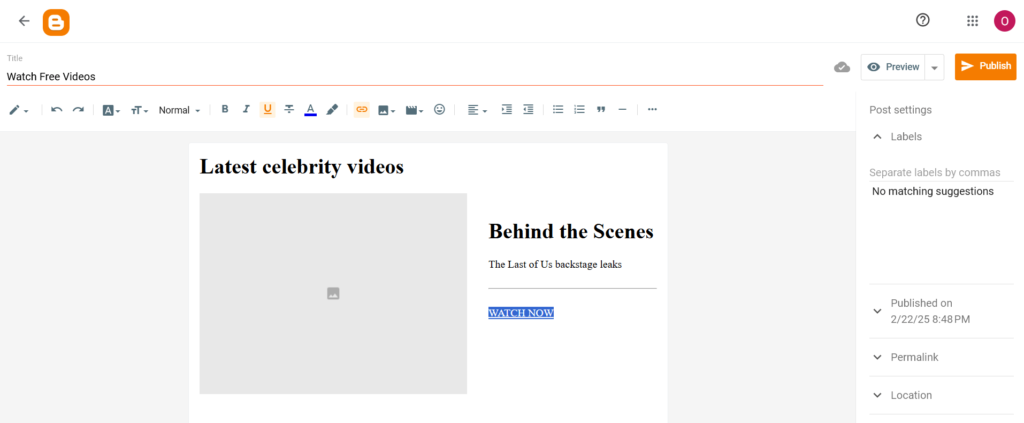
    add-links-blogger

    When adding a link, tick the “Add rel=nofollow attribute.” This will stop Google robots from following this link. Click Apply.

    Use the same strategy as before: place Direct Links on visible elements along with the general URLs you want to include in the page.

    4. Preview and publish your blog and page

    • From the right, lick Permalink and add a custom slug for the landing page
    • main menu, click Preview and check how the blog looks
    • Click Publish and ensure all links work properly.

    preview-and-publish-blogger

    Using Wix to make landings without a website

    Option 1: Sign up and choose a template

    • Go to https://www.wix.com/ and hit Get started
    • Sign up with your email or Google account. Confirm your email if you didn’t register with Google.
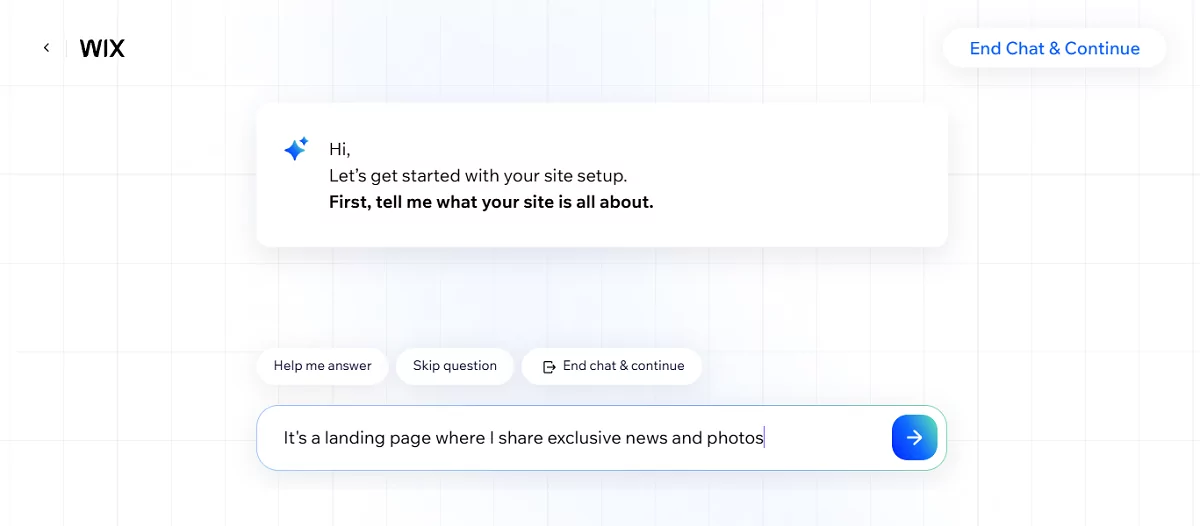
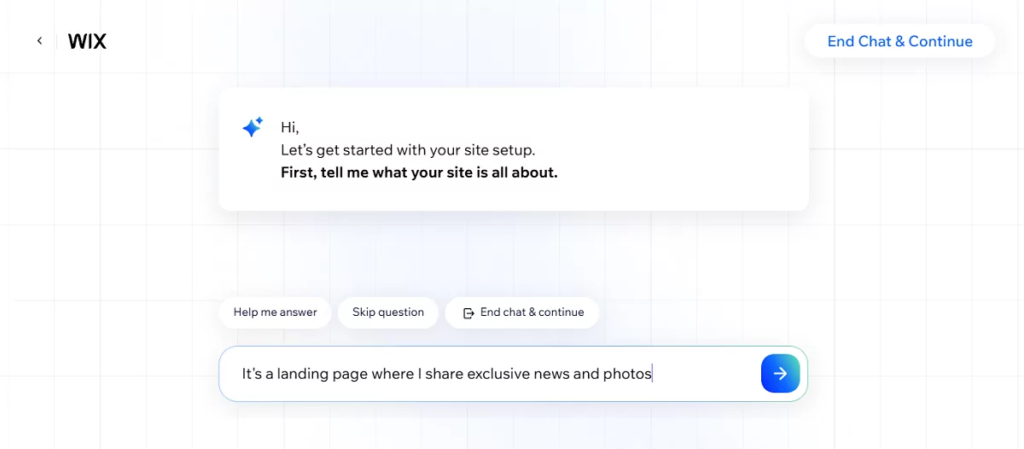
    • You can now click Create New Site. You can skip the AI-powered wizard or try to make a landing with its help, but it can return a multipage site anyway.
    ai-wizard-wix
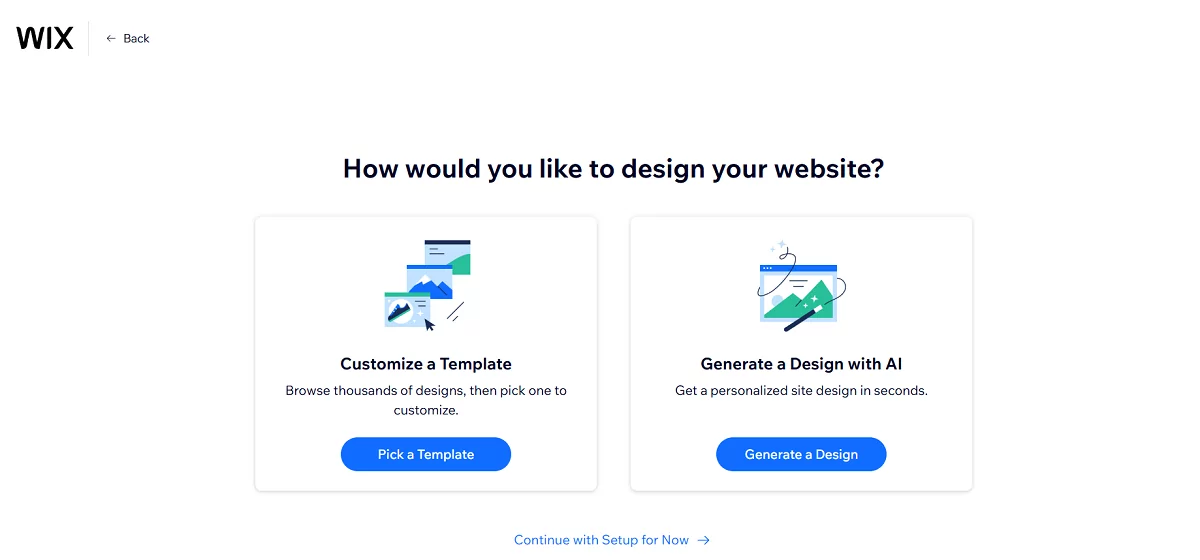
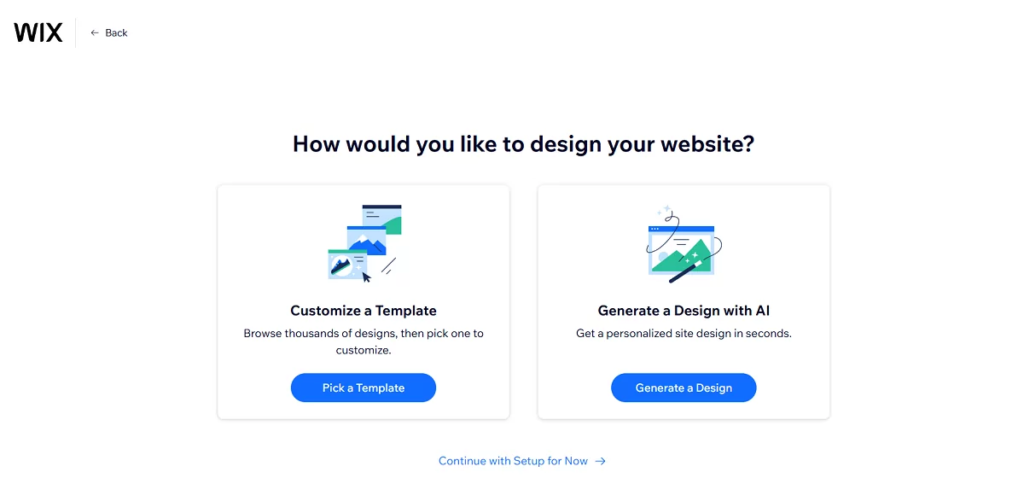
    • Once finished, jump to your Wix account and click Design site. You’ll be offered to continue designing with AI or pick a template: it’s up to you.
    templates-wix
    • From the template gallery (or with the help of Wix AI assistant), pick a simple site: it will usually be a Portfolio template. You’ll be able to remove unnecessary pages, then.

    Option 2: Start with the Wix landing page

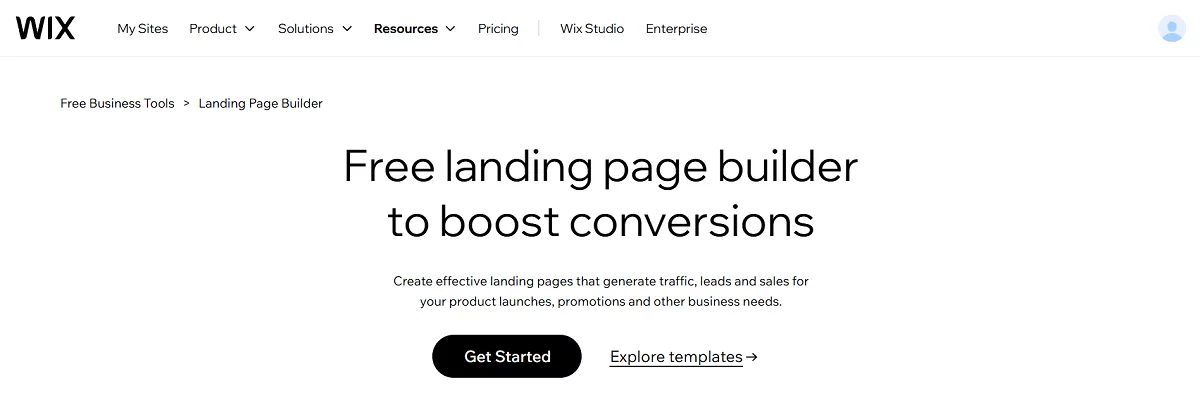
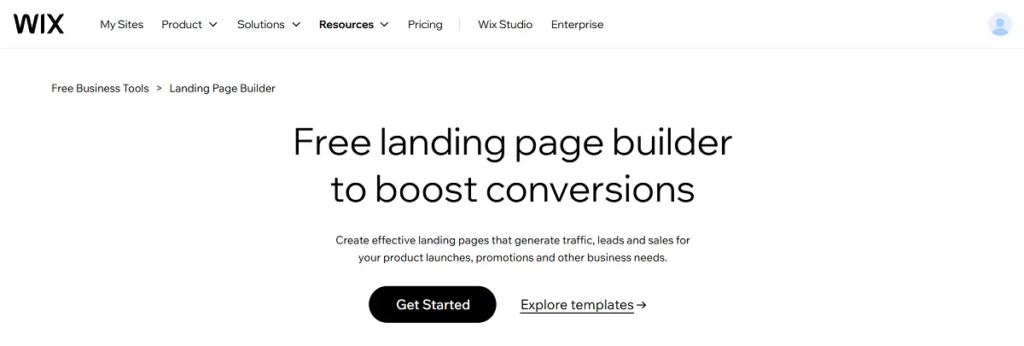
    • Go to Wix Landing Page Builder and sign up as requested
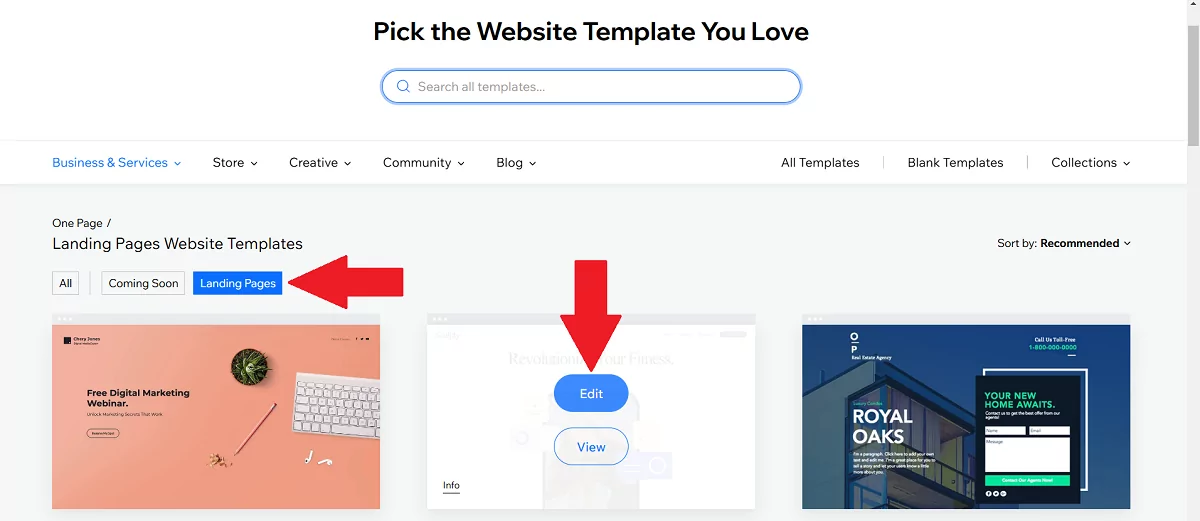
    • Choose between the two options: Get started or Choose a template. The choice of templates is quite poor, but sufficient for our goals.
    landing-page-with-no-website-on-wix
    • When the choice is made, click Edit this site.
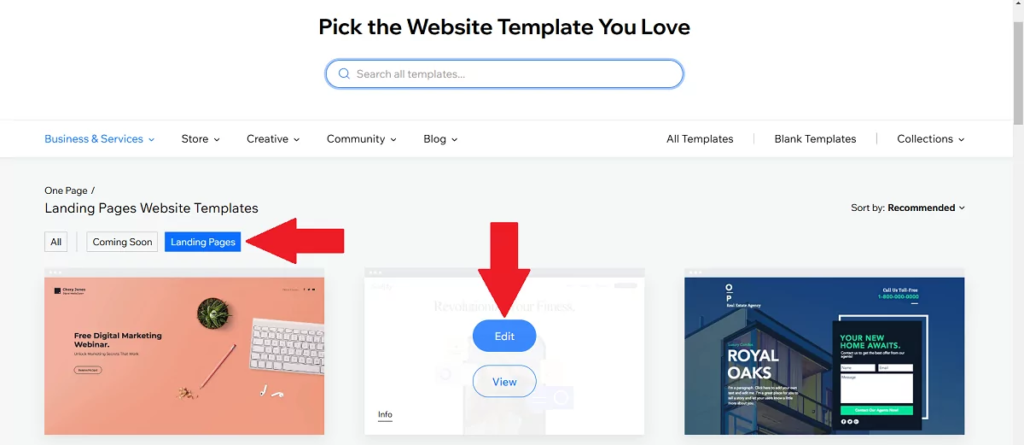
    edit-template-landing-page-or-site-wix

    3. Edit content

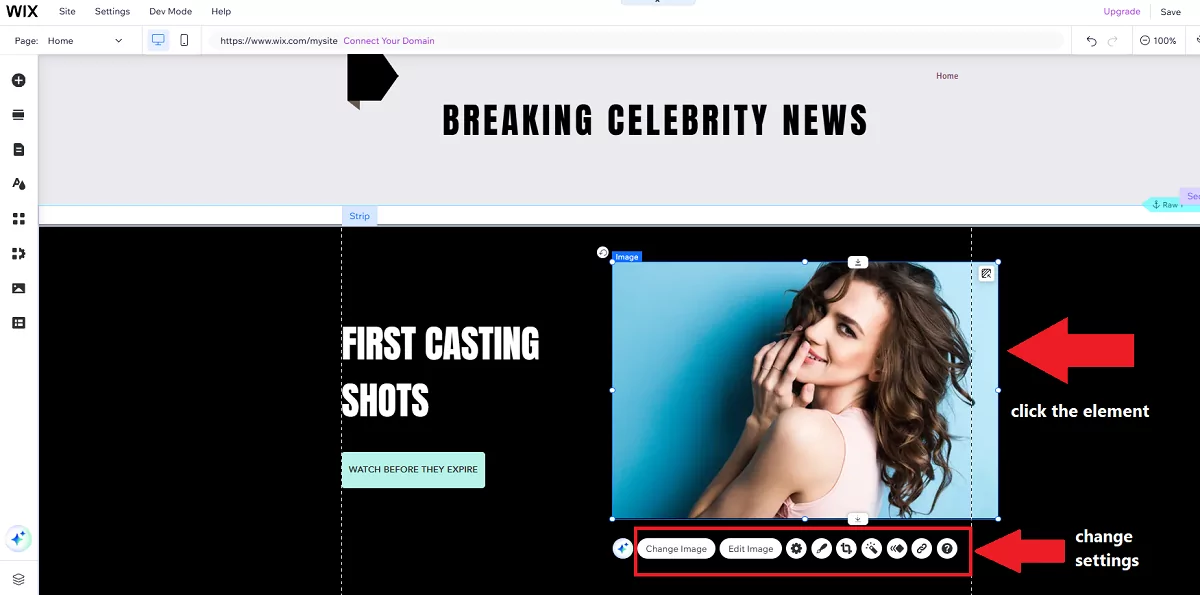
    • Click on a template element and change its settings. You can replace template texts, images, backgrounds, and buttons.
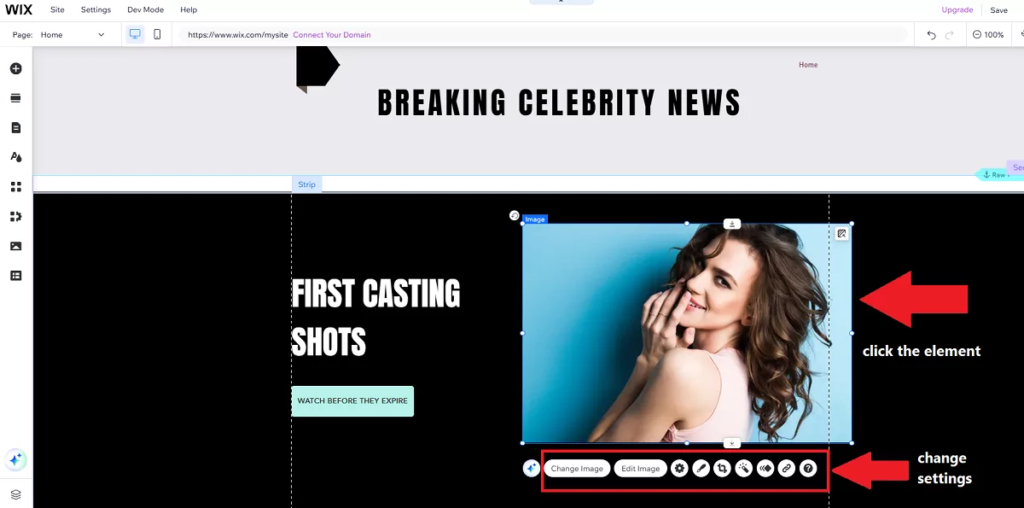
    change-element-settings
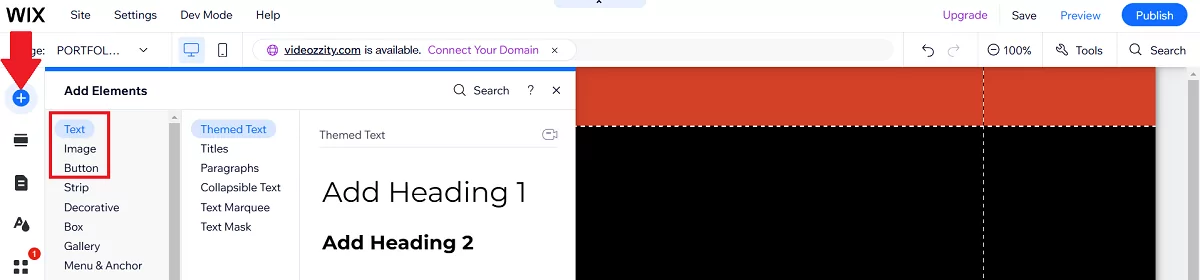
    • Click the “+” icon from the left and add necessary elements like images, headlines, and buttons.
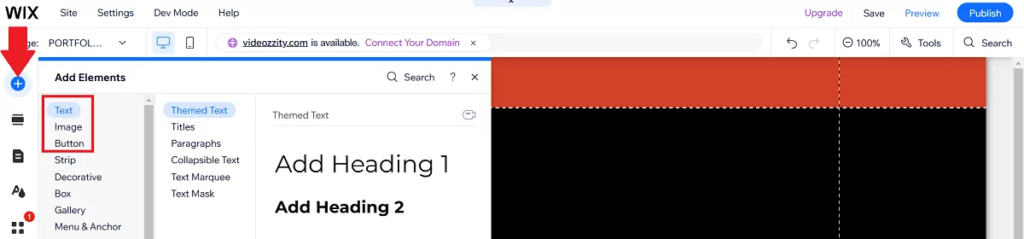
    add-elements-to-wix-landing-page

    3. Add links

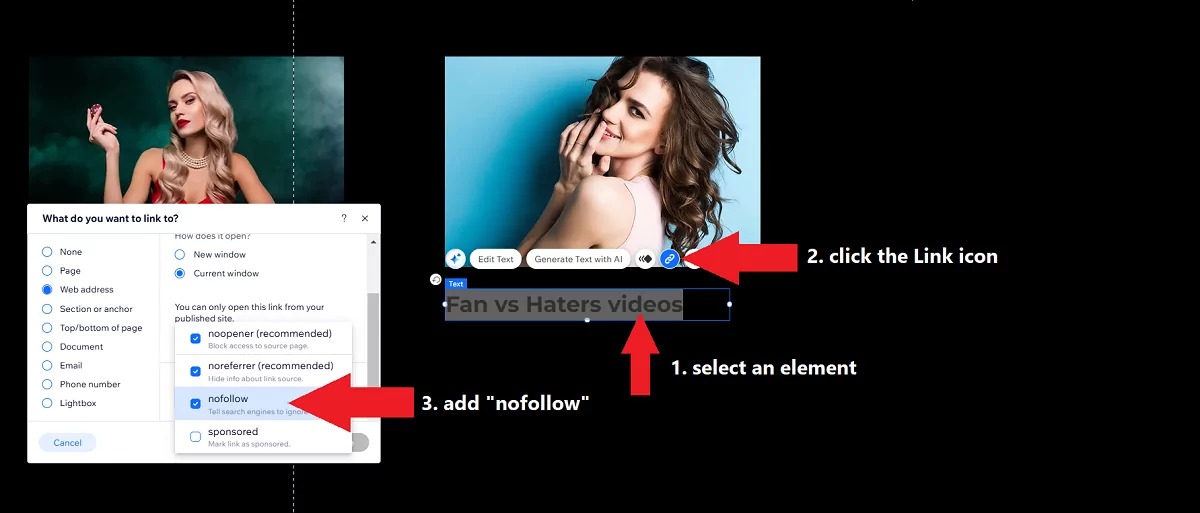
    • Select a piece of text or click an image / button and place links: distribute Direct Links along with your main URLs
    • Switch the “no-follow” attribute to your links by choosing Advanced SEO Settings
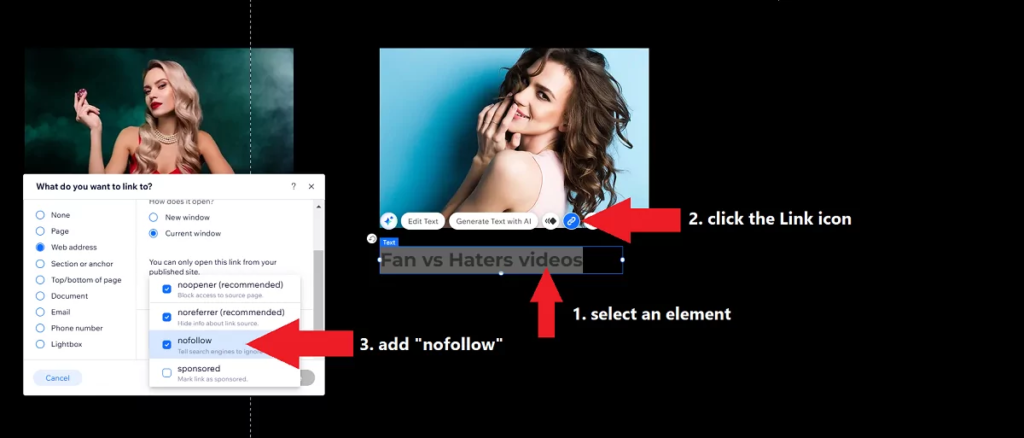
    no-follow-attributes-wix
    • You can also prevent all your web sources from crawling by choosing Settings → Site, domain & SEO → SEO Settings and turning off the toggle “Let search engines index your site.”

    4. Customize design

    • Use the drag-and-drop editor to adjust layouts and spacing.
    • Open the mobile preview and move elements to fit the screens (Wix doesn’t provide responsive designs, but you can adjust layouts manually)

    5. Preview and publish your Wix landing page

    • Click Save to save all changes
    • Hit the Preview link and check how the page looks on mobile devices. You can also switch to Mobile view from the Editor
    • Click and follow all links added previously

    mobile-preview-page-on-wix
    • Select Publish with a Wix domain
    • Test the live page for functionality and responsiveness.

    Read also: Your full guide to Wix website monetization with various advertising formats: Banners, Popunders, Social Bar, etc.


    Post-launch checklist

    • Test functionality: Ensure all links, buttons, and forms work.
    • Optimize for speed: Compress images and remove unnecessary elements.
    • Preview on mobile: Test the page on multiple devices.
    • Share & promote: Create a content plan for sharing your landing page on Facebook to engage people to come and check your content. Remember, you will only make money if people come to your lander, not the Facebook posts or stories.

    INCREASE ONLINE REVENUE

    Comparison: Wix vs. Google Sites vs. Blogger vs. WordPress

    So which is best for developing a landing page without a website? This comparison table provides an actionable breakdown of the four platforms we observed above. Use it in case you haven’t decided on the best option yet.

    FeatureWixGoogle SitesBloggerWordPress
    Ease of AccessFree plan available with Wix branding. Paid plans start at $16/month.Completely free. Use it with your current Google account or create a new one.Completely free. Use it with your current Google account or create a new one.Free with WordPress.com (limited features). Self-hosted (WordPress.org) requires hosting (e.g., 3−3−10/month).
    Ease of UseDrag-and-drop editor makes it beginner-friendly but might seem clutteredSimple and intuitive, but limited customization.Easy to use, but outdated interface.Easy to use if you only need a landing page; requires familiarity with plugins and themes.
    User Experience (UX)Trendy and polished; great for visual learners.Basic and functional; ideal for quick, no-frills pages.Outdated but straightforward; best for text-heavy pages.Highly customizable; can seem complex for beginners.
    SpeedModerate; can be slow if too many elements are added.Fast; hosted on Google’s servers.Fast, lightweight, and simple.Fast when used for landers. Big sites can also be very fast if optimized.
    PurposeVersatile; mostly used by freelancers, small businesses, and eventsBest for simple, informational pages (e.g., local businesses)Best for bloggers and text-based content; offer minimum tools for formatting.Ideal for advanced users; suitable for blogs, businesses, and complex sites.
    SEO CapabilitiesBasic; built-in SEO tools, but limited flexibility.Minimal; limited SEO options but nice discoverability.Basic; relies on Google’s SEO but lacks advanced tools.Great; supports plugins like Yoast SEO for advanced optimization.
    Adding ImagesVery easy; drag-and-drop editor with built-in image library.Easy, straightforward image uploads.Easy; simple image uploads but limited editing options.Easy; supports media library and plugins for advanced editing.
    Adding ButtonsVery easy; drag-and-drop buttons with customization options.Easy; basic button functionality.Moderate; requires HTML/CSS for advanced buttons.Easy; built-in button elements and plugins to create advanced buttons.

    Which website builder is better for landing page creation?

    1. Best for beginners:
      • Google Sites: Completely free and simple, but limited in features.
      • Blogger: Also simple in usage, but a bit poor in tools. Blogger can’t create stand-alone pages, but you can limit the homepage to one post.
      • Wix: Suitable if you need a versatile drag-and-drop builder, but the platform is quite heavy in usage with loads of micro actions required.
    2. Best for Bloggers:
      • WordPress: Ideal for bloggers who want full control, scalability and advanced optimization for search engines.
      • Blogger: Free and straightforward, but outdated.
    3. Best for advanced users:
      • WordPress: Highly customizable with plugins and themes, but requires technical knowledge. It’s one of the best platforms to monetize content.
    4. Best for speed:
      • Google Sites: Fast and lightweight, hosted on Google’s servers.
      • Blogger: Also fast, but limited in functionality.
      • WordPress: quite fast if you don’t overload the page.
    5. Best for SEO:
      • WordPress: Unmatched SEO capabilities with plugins like Jetpack, Yoast SEO, and Slim SEO.
    6. Best for visual appeal:
      • Wix: Trendy templates and UX-friendly layouts make your landing pages visually appealing.
      • WordPress: Highly customizable, but requires effort to achieve high-quality results.
    7. Best for monetization:
    • WordPress: You can place the majority of ad formats here; the platform is compatible with Adsterra, Google AdSense and many other high-paying networks.

    When to use each platform

    PlatformBest Use Case
    WixBeginners, small businesses needing a visually appealing landing page quickly.
    Google SitesQuick, simple landing pages for promoting one product or for informational purposes. Mostly used to advertise local businesses like shops and cafés but works great for traffic monetization purposes.
    BloggerPublishers or affiliate marketers focusing on minimalistic pages but with a prospect to grow into a website or blog.
    WordPressBeginners or pros in search of a universal tool for SEO-friendly site building. 

    Summing up:

    Making a landing page without a website is much easier than you imagined. It all depends on the purpose: you don’t require in-depth optimization if you drive traffic from Facebook or other social networks. What you truly need is a nicely paying Direct Link. And you’re just one step away from getting it!

    GET PAID FOR TRAFFIC

    Landing page without a website: FAQs

    What’s the difference between a landing page and a website?

    The difference between a landing page and a website is in their purpose and complexity. Websites consist of multiple pages connected with inner links and dedicated to presenting a business in general or a set of topics with one idea: news, entertainment, artificial intelligence, sports, etc. Landing pages are far more specific: you make one to showcase one service or sell one product with one goal: make people buy it.

    Do I need a domain for a landing page without a website?

    Yes, all web resources, even those limited to a single page, require a domain. You may use a free domain offered by your platform (e.g., WordPress or Blogger) or refer to paid providers of domain names.

    What are the main steps to create a landing page?

    Here are must-have steps to create a landing page with no website.

    Step 1: Define the purpose 
    Ensure you know the purpose or goal of the page. Examples: collect emails for newsletters, sell goods, sell online courses, get ad clicks.

    Step 2: Decide how to make users convert
    You defined the purpose of a lander, but how will you achieve this goal? Make a content draft: main benefits of the product, its differentiators, ways it solves users’ problems, proofs.

    Step 3. Create main copy and design
    Transform the draft into a story. Start with a clear offer

    Step 4. Add CTA buttons
    Ensure users can make a desired action easily. It’s better to include call-to-action buttons in the hero section (the first screen of the page), the main menu, and between important content blocks.

    Make CTAs powerful and engaging. Instead of “Create account,” write “Join and earn.” All links and buttons must tell users exactly what to do next: SIGN UP, GET NOW, START A FREE TRIAL, etc.

    Step 5. Design your landing page
    – Build your landing page with blocks according to its purpose and the content. Add separators and spacers to make the page neat.
    – Use high-quality images, but ensure to compress them to make your page load fast. 
    – Add illustrative images that prove your offer’s advantages, avoid placing dull pictures only for decoration.

    Step 6. Test your page on desktop and mobile devices
    Many website builders offer responsive design, but still, it’s important to recheck the functionality manually in various browsers.

    Step 7. Publish the page and test the live version.

    What’s the structure of a landing page?

    Here’s the structure of an effective landing page:

    Menu:
    Make a sticky menu (a top bar or a hamburger) so users can navigate any page section easily. Add a CTA button to the menu.

    Hero section:
    – The hero section is the first area users see right after opening a page. It’s placed under the menu/header. 
    – Add an offer (e.g., “Get Free Videos,” “Exclusive photos,” “Best APKs for Android”).
    – Include buttons or noticeable links
    – Insert a button with a call to action or CTA (e.g., “Sign Up Now,” “Download,” “Get Now”) depending on what users need to do.

    Lead form
    One of the landing pages’ purposes is lead generation: registrations, subscriptions, pre-orders. 
    – Make a brief description outlining the purpose of the form
    – Keep your form short: add only necessary fields
    – Make every step clear to the user
    – Keep the right format: texts, emails, numbers
    – Add contrast and visible buttons
    – Add a message for successful form submission
    – Create an error message
    – Test the form from various devices

    Benefits:
    – Use bullet points or icons to highlight key benefits.
    – Add icons to make the info neat and visually appealing.

    Testimonials/Proofs:
    – Include a section for customer testimonials or trust badges (if available).
    – Add proofs (payments, product reviews, awards)

    FAQs section:
    – Include answers to the most asked questions to remove doubt and help users convert faster.
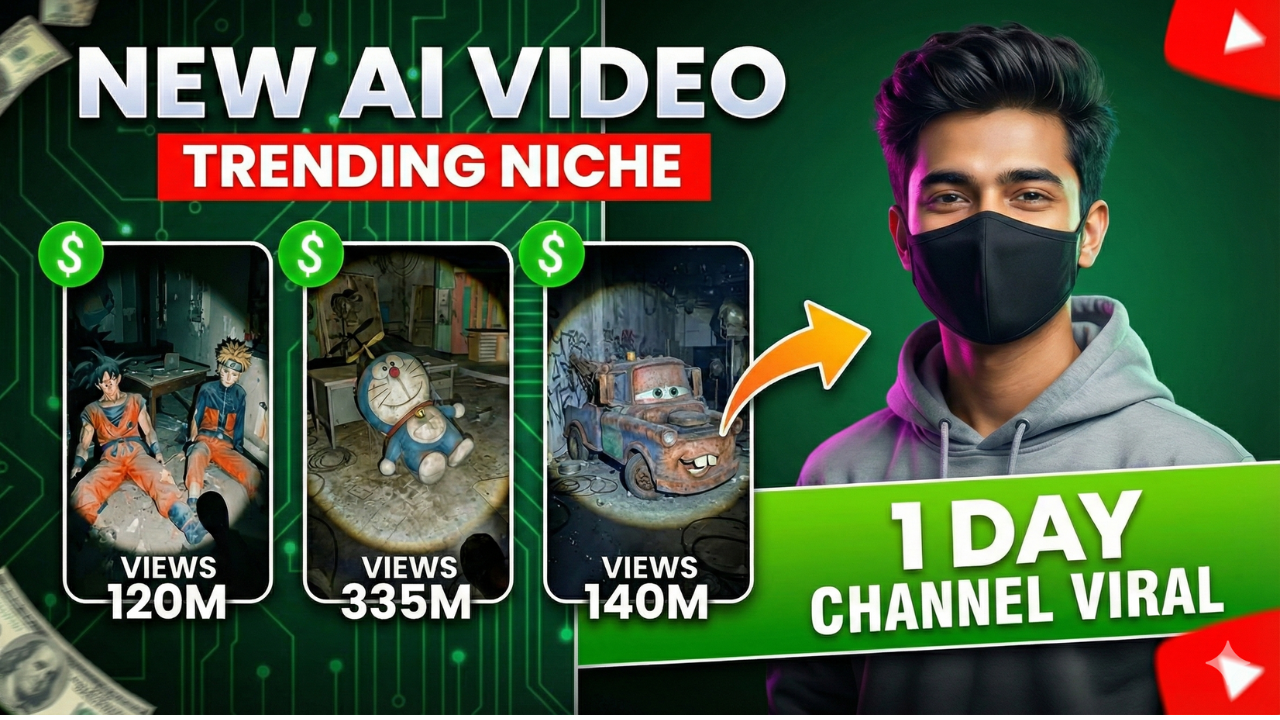
  • New Trending Reels videos

    New Trending Reels videos

    Here is the Linked mentioned in video
    click here

    New Trending Reels videos are everywhere right now.
    Here’s a simple way to create them using free AI tools, plus one extra step most people skip.
    Watch here 👇
    https://youtu.be/3PpLGY24kI8

    #AIVideos #ContentCreation #AbandonedCharacter #FreeAITools

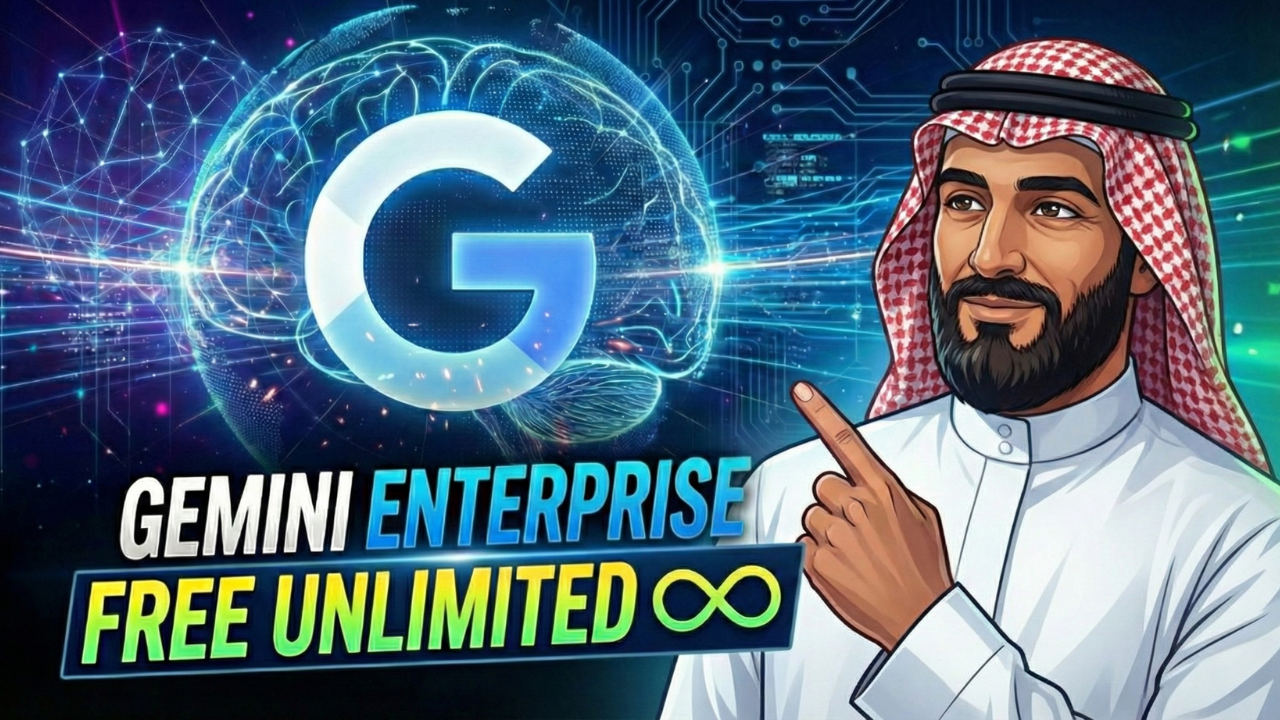
  • Free Gemini Enterprise Account | Images, Agents & Veo 3

    Free Gemini Enterprise Account | Images, Agents & Veo 3

    You’ll learn:

    • How to sign up for Gemini Enterprise
    • Why a business email is required
    • What to do if you don’t have a business email
    • How to get full access using a simple method
    • How to use Gemini Enterprise features like image generation, agents, and Veo 3 videos

      Link to get access

    try the secret Business email for this
    click to visit
    Check the video to know how it works
    https://youtu.be/e1lPQM3oEuE

  • Influencer Marketing: Dispelling Myths & Answering Your Questions

    Influencer Marketing: Dispelling Myths & Answering Your Questions

    Influencer Marketing: Dispelling Myths & Answering Your Questions

    Ever find yourself scrolling, only to pause because someone you trust (or simply enjoy watching) shares something cool? It feels more like a friend’s recommendation than a hard sell, doesn’t it? That’s the magic in play, and it’s why influencer marketing has become such a big deal for businesses of all sizes.

    It’s not just about celebrities anymore. It’s a dynamic, ever-changing space, and with change comes questions and, naturally, a few myths. We’re here to clear the air, answer your frequently asked questions, and help you see this exciting strategy for what it truly is.

    influencer marketing,
    Photo by hoffmannmurtaugh.com

    This approach builds real connections. It taps into trust that traditional ads often struggle to capture. So, let’s get into the specifics and understand how to navigate this world without falling for common traps.

    What Even Is Influencer Marketing, Anyway?

    Simply put, influencer marketing means working with individuals who have established credibility and an audience in a specific niche. These individuals, or ‘influencers,’ share their thoughts and experiences about your brand or product, swaying their followers’ purchasing decisions.

    It’s a powerful shift from loud, interruption-based advertising. Instead, it weaves your message into content people already enjoy. Think of it as word-of-mouth, just amplified by digital platforms.

    Common Questions & Big Misconceptions

    Let’s tackle some of the biggest hang-ups people have about this marketing approach.

    “It’s Just for Big Brands & Celebrities, Right?”

    This is a really common thought, but it couldn’t be further from the truth. While mega-influencers (the celebrities with millions of followers) definitely exist, the true power often lies elsewhere.

    * Micro-influencers: These individuals usually have 10,000 to 100,000 followers. They often have very dedicated, engaged audiences.
    * Nano-influencers: With fewer than 10,000 followers, these creators are deeply connected to their small, passionate communities. They build incredible trust.

    Many businesses, especially smaller ones, find incredible success working with micro and nano-influencers. These partnerships can be more authentic and often more affordable.

    “Isn’t It All Fake Followers and Bots?”

    It’s true that some bad actors exist. However, that’s not the norm. The key is to look beyond just follower numbers. Authenticity and engagement are what truly matter.

    * Look for a strong engagement rate (likes, comments, shares relative to follower count).
    * Check the quality of comments. Are they generic emojis or thoughtful discussions?
    * Examine the influencer’s content quality and consistency.
    * Audience demographics should align with your target customers.

    “True influence comes from trust and connection, not just large numbers. Always prioritize genuine engagement.”

    Want to talk through specific tactics for spotting genuine partners? Join the conversation at the Digital Marketing Pros Facebook group. It’s a fantastic spot to swap stories and get honest advice on building real relationships with creators.

    “My Product Isn’t ‘Glamorous’ Enough for Influencers.”

    This is another myth that holds many businesses back. Influencer marketing works for nearly any product or service, no matter how niche or “un-glamorous” it seems.

    influencer marketing,
    Photo by www.interodigital.com

    Think about it:
    * A tech reviewer can showcase a new productivity app.
    * A financial planner can discuss helpful budgeting software.
    * A DIY enthusiast can feature unique tools or materials.
    * Even B2B companies find success by partnering with industry thought leaders on platforms like LinkedIn.

    The trick is to find an influencer whose audience genuinely cares about what you offer, even if it’s a solution to a specific problem rather than a flashy item.

    “It’s Super Expensive, Isn’t It?”

    Costs vary wildly. Just like with media buying, you can spend a lot or a little. Your budget often dictates the *type* of influencer you work with, not whether you can do it at all.

    Consider these payment models:

    • Free products/services: Often for nano or micro-influencers.
    • Affiliate commissions: Influencers earn a percentage of sales they drive.
    • Flat fees: A set amount per post, campaign, or period.
    • Hybrid models: A mix of flat fees and performance incentives.

    Many businesses start small, sending products to micro-influencers and tracking results. The return on investment (ROI) can be substantial, even with modest spending, if you choose the right partners.

    Making Influencer Marketing Work for You: Practical Steps

    Now that we’ve busted some myths, let’s talk about how you can actually make influencer marketing work for your brand.

    Finding the Right Match

    This step is arguably the most crucial. It’s not about the biggest name; it’s about the best fit.

    * Audience alignment: Does their audience match your ideal customer profile?
    * Content style: Does their aesthetic and tone fit your brand image?
    * Values: Do they genuinely align with your brand’s mission and ethics?

    Here’s a look at how different influencer types might serve your brand:

    Influencer Type Primary Benefit for Brands Example Campaign
    Celebrity Massive Reach, Brand Association High-profile product launch announcement
    Macro (100K-1M) Broad Audience, Professional Content Series of engaging lifestyle posts
    Micro (10K-100K) High Engagement, Niche Trust Detailed product review or tutorial
    Nano (<10K) Deep Trust, Community Feel Authentic personal testimonial, Q&A

    For deeper insights and connecting with professionals, check out Growth Accelerators on LinkedIn. Their page often shares advice on spotting great partners and growing your network.

    Clear Goals and Creative Briefs

    Before you even reach out, know what you want to achieve. Are you aiming for:

    • Brand awareness?
    • Website traffic?
    • Direct sales?
    • User-generated content?

    Once you have your goal, give your chosen influencer a creative brief. This explains your brand, the campaign’s purpose, key messages, and any mandatory disclosures. But remember to give them creative freedom too! They know their audience best.

    Measuring Success Beyond Likes

    Likes are nice, but they don’t tell the whole story. To truly measure how well your influencer campaign performs, look at:

    * Reach & Impressions: How many people saw the content?
    * Engagement Rate: How many interacted (likes, comments, shares)?
    * Website Traffic: Did unique visitors increase after the campaign?
    * Conversions: Did people sign up, download, or purchase using tracking links or codes?
    * Brand Sentiment: What are people saying about your brand in comments and mentions?

    influencer marketing,
    Photo by www.forbes.com

    The right metrics depend on your initial goals. If you wanted awareness, reach is key. If you wanted sales, conversions are your north star.

    The Future is Authentic

    The landscape of influencer marketing continues to evolve. We’re seeing a stronger move towards long-term partnerships, where influencers become genuine brand advocates rather than one-off promoters. The emphasis on authenticity, transparency, and building community is stronger than ever.

    Staying current with trends helps. For the latest trends and quick insights, give MarketingPulse on Twitter a look. They share great snippets that keep you current on what’s new.

    Ultimately, this marketing strategy isn’t a fleeting trend; it’s a powerful way to connect with your audience in a genuine, human way. By understanding the nuances and dispelling the common myths, you can unlock its real potential for your business.

    ### Hashtags
    InfluencerMarketing, DigitalMarketing, ContentMarketing, MarketingTips, SocialMedia, BrandBuilding, CreatorEconomy, MarketingStrategy, MarketingPulse, GrowthAccelerators

  • Social Media Marketing: Weighing the Pros and Cons

    Social Media Marketing: Weighing the Pros and Cons

    Social Media Marketing: Weighing the Pros and Cons

    The way we interact with businesses has changed dramatically over the past decade, and social media marketing has been at the forefront of this shift. With billions of people around the world using social media platforms like Facebook, Twitter, and Instagram, it’s no wonder that companies are eager to tap into these vast audiences.

    social media marketing,
    Photo by Andrea Piacquadio

    The potential for social media marketing to reach and engage with customers is undeniable, but it’s not without its drawbacks. As we navigate the complex world of online marketing, it’s crucial to understand both the benefits and the pitfalls of using social media to promote our businesses.

    Pros of Social Media Marketing Cons of Social Media Marketing Tips for Effective Social Media Marketing

    The Pros of Social Media Marketing

    So, what are the advantages of using social media marketing for our businesses? For starters, it allows us to reach a vast audience with minimal upfront costs. We can create a business page on most social media platforms for free, and then use targeted advertising to reach our ideal customers. This can be especially helpful for small businesses or startups that don’t have the budget for traditional forms of advertising.

    • Increased brand awareness
    • Improved customer engagement
    • Targeted advertising options
    • Competitor analysis and benchmarking
    social media marketing,
    Photo by MART PRODUCTION

    The Cons of Social Media Marketing

    While social media marketing can be a powerful tool for businesses, it’s not without its drawbacks. One of the biggest challenges is the sheer amount of noise and competition on social media platforms. With so many businesses vying for attention, it can be difficult to stand out and get our message heard. Additionally, social media platforms are constantly changing their algorithms, which can make it difficult to keep up with the latest best practices.

    Understanding the pros and cons of social media marketing is crucial for businesses that want to succeed in the online marketplace.

    Pros Cons
    Increased brand awareness Competition and noise on social media platforms
    Improved customer engagement Constantly changing algorithms
    Targeted advertising options Difficulty in measuring ROI
    social media marketing,
    Photo by RDNE Stock project

    Tips for Effective Social Media Marketing

    So, how can we make the most of social media marketing for our businesses? First and foremost, it’s essential to have a clear understanding of our target audience and what they want to see from us on social media. We should also be consistent in our posting schedule and engage with our followers by responding to comments and messages.

    • Know your target audience
    • Be consistent in your posting schedule
    • Engage with your followers
    • Use high-quality visual content

    To learn more about social media marketing and how to leverage it for our businesses, we can check out online resources like HubSpot and Social Media Examiner. By staying up-to-date with the latest trends and best practices, we can stay ahead of the competition and achieve our marketing goals.

    ### Hashtags
    socialmedia, marketing, digitalmarketing, onlinebusiness, smallbusiness, entrepreneur, startup, socialmediamarketing, brandawareness, customerengagement, targetedadvertising, competitoranalysis, benchmarking, ROI, socialmediaanalytics, contentmarketing, visualcontent, influencermarketing, trending, readmore, update, inspiration

  • Social Media Marketing: The Game Changer in Digital Promotion

    Social Media Marketing: The Game Changer in Digital Promotion

    Social Media Marketing: The Game Changer in Digital Promotion

    The world of digital marketing has witnessed a significant shift in recent times, with social media marketing emerging as a top choice for businesses and individuals alike. The ability to reach a vast audience, build brand awareness, and drive sales has made social media a crucial component of any marketing strategy.

    social media marketing,
    Photo by Andrea Piacquadio

    As we delve into the world of social media marketing, it’s essential to understand the various alternatives available. From influencer marketing to email marketing, each platform has its unique benefits and drawbacks. In this article, we’ll explore the ins and outs of social media marketing and compare it with other popular alternatives.
    Table of Contents

    Social Media Marketing: A Closer Look

    Social media marketing involves using platforms like Facebook, Instagram, and Twitter to promote products, services, or brands. With billions of active users, these platforms offer an unparalleled opportunity to reach a vast audience. By creating engaging content, businesses can build brand awareness, drive website traffic, and generate leads.

    social media marketing,
    Photo by MART PRODUCTION

    For instance, a company like Hootsuite provides a range of tools to help businesses manage their social media presence and create effective marketing campaigns.

    Alternative Marketing Strategies

    While social media marketing is a popular choice, there are other alternatives that businesses can explore. Influencer marketing, for example, involves partnering with influencers to promote products or services to their followers. Email marketing, on the other hand, involves sending targeted emails to customers or potential customers to build brand awareness and drive sales.

    social media marketing,
    Photo by RDNE Stock project
    Marketing Strategy Cost Reach Engagement
    Social Media Marketing Low-Moderate High High
    Influencer Marketing Moderate-High Moderate Moderate
    Email Marketing Low Low-Moderate Low-Moderate

    As

    Neil Patel

    once said, “The key to successful marketing is to understand your audience and create content that resonates with them.”

    Comparative Analysis: Social Media Marketing vs. Alternatives

    So, how does social media marketing compare to other alternatives? In terms of cost, social media marketing is relatively low-cost, with most platforms offering free or low-cost advertising options. In terms of reach, social media marketing offers an unparalleled opportunity to reach a vast audience, with billions of active users on platforms like Facebook and Instagram.

    When it comes to engagement, social media marketing offers a range of options, from likes and comments to shares and follows. By creating engaging content and using the right social media marketing tools, businesses can build brand awareness, drive website traffic, and generate leads. For more information, join our community at Digital Success and learn from industry experts.

    ### Hashtags
    socialmedia, marketing, digitalpromotion, influencermarketing, emailmarketing, socialmediatools, digitalsuccess, onlinepresence, brandawareness, leadgeneration, websitetraffic, engagement, reach, cost, returnoninvestment

  • How Social Media Marketing Changed My Business

    How Social Media Marketing Changed My Business

    How Social Media Marketing Changed My Business

    I still remember the day I decided to take my business online. I had a small coffee shop, and I was struggling to attract new customers. That’s when I discovered the power of social media marketing. I created a Facebook page, started posting pictures of my coffee, and engaged with my followers. It wasn’t long before I saw a significant increase in sales.

    social media marketing,
    Photo by www.investopedia.com

    My Facebook page became a hub for my customers to share their experiences, provide feedback, and connect with each other. I was able to build a community around my brand, and it helped me to understand my customers better. I started to use social media analytics to track my performance, and it gave me valuable insights into what was working and what wasn’t.

    Table of Contents

    What is Social Media Marketing?
    Benefits of Social Media Marketing
    Tips for Social Media Marketing

    What is Social Media Marketing?

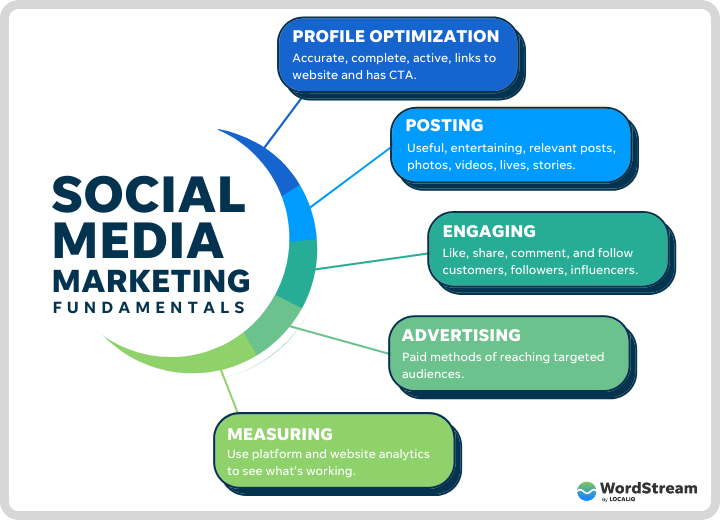
    Social media marketing is the process of creating and sharing content on social media platforms to achieve your marketing goals. It involves creating a strategy, producing content, and engaging with your audience. It’s not just about posting updates; it’s about building a relationship with your customers. You can join the Social Media Marketing Group to learn more about it.

    social media marketing,
    Photo by www.wordstream.com

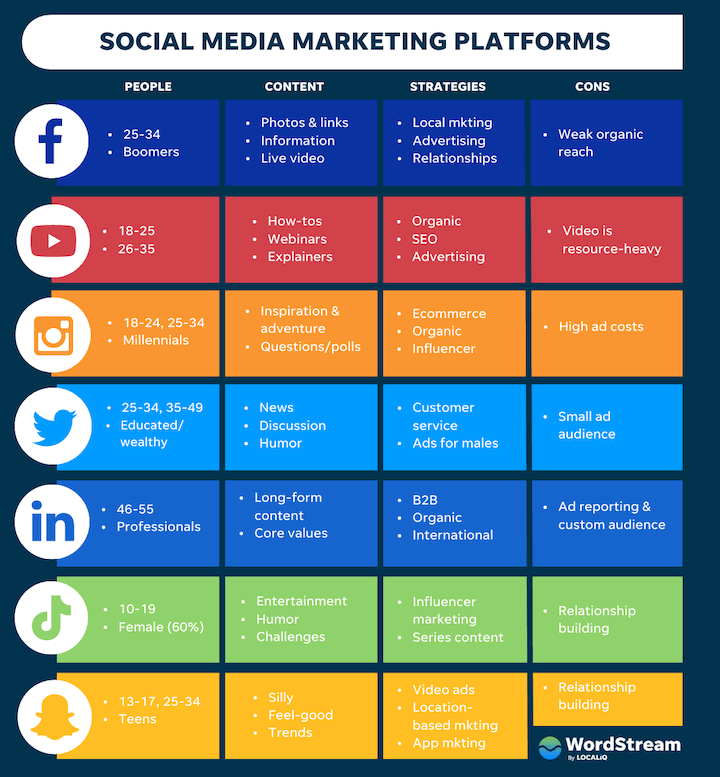
    Each social media platform has its unique features, and you need to understand them to create an effective social media marketing strategy. For example, Instagram is visual, Twitter is fast-paced, and Facebook is community-driven. You can use Buffer to schedule your posts and save time.

    Benefits of Social Media Marketing

    The benefits of social media marketing are numerous. It can help you to:

    • Increase brand awareness
    • Drive website traffic
    • Generate leads
    • Boost sales

    It’s also cost-effective, and you can target your audience with precision. You can use Hootsuite to manage your social media campaigns and track your performance.

    social media marketing,
    Photo by www.beingdigitalz.com

    I saw a significant increase in sales after I started using social media marketing. It helped me to reach a wider audience, and I was able to build a loyal customer base. You can use Canva to create visually appealing graphics and attract more customers.

    Tips for Social Media Marketing

    Here are some tips for social media marketing:

    • Be consistent
    • Engage with your audience
    • Use high-quality visuals
    • Monitor your performance

    You can also use influencer marketing to reach a wider audience. You can join the Influencer Marketing Hub to learn more about it.

    Platform Features Benefits
    Facebook Community-driven, targeted ads Increased brand awareness, website traffic
    Instagram Visual, hashtag-driven Increased brand awareness, engagement
    Twitter Fast-paced, real-time engagement Increased brand awareness, customer service

    Social media marketing is not just about posting updates; it’s about building a relationship with your customers. It’s about creating a community, engaging with your audience, and providing value.

    ### Hashtags
    socialmedia, marketing, business, growth, onlinepresence, brandawareness, digitalmarketing, socialmediatips, influencermarketing, contentmarketing, smallbusiness, entrepreneur, startup, successstory, inspiration, motivation, readmore, update, trending

  • Social Media Marketing: Separating Fact from Fiction

    Social Media Marketing: Separating Fact from Fiction

    Social Media Marketing: Separating Fact from Fiction

    When you think of social media marketing, you probably imagine a world where likes, shares, and followers are the ultimate goals. But what if I told you that’s not entirely true? There’s a lot of misinformation floating around, and it’s time to set the record straight.

    social media marketing,
    Photo by Collabstr

    The truth is, social media marketing is a complex beast that requires a deep understanding of your audience, their needs, and the platforms they use. It’s not just about posting pretty pictures or writing witty captions; it’s about creating a consistent brand voice that resonates with your target market.

    Table of Contents

    Social Media Marketing FAQs

    If you’re new to social media marketing, you probably have a lot of questions. What’s the best platform to use? How often should I post? What kind of content should I create? The answers to these questions vary depending on your business and audience, but one thing’s for sure: engagement is key. You can’t just post and expect people to engage; you need to spark conversations, ask questions, and listen to feedback.

    social media marketing,
    Photo by Piotr Cichosz

    To get started, check out our community forum where you can connect with other business owners and learn from their experiences.

    Common Misconceptions About Social Media Marketing

    There are a lot of misconceptions about social media marketing that can hurt your business. For example, some people think that buying followers is a good idea, but it’s not. Not only is it against the terms of service of most platforms, but it also doesn’t lead to real engagement. Another misconception is that social media marketing is a one-size-fits-all solution. The truth is, every business is unique, and what works for one business may not work for another.

    Misconception Reality
    Buying followers is a good idea It’s against the terms of service and doesn’t lead to real engagement
    Social media marketing is a one-size-fits-all solution Every business is unique, and what works for one business may not work for another

    Measuring Success in Social Media Marketing

    So, how do you measure success in social media marketing? It’s not just about likes and followers; it’s about conversions, sales, and customer loyalty. You need to track your metrics and adjust your strategy accordingly. For example, if you’re getting a lot of engagement on your posts, but not many conversions, you may need to adjust your call-to-action or optimize your landing page.

    social media marketing,
    Photo by Collabstr

    To learn more about measuring success in social media marketing, join our upcoming webinar where we’ll dive into the latest trends and strategies.

    Social Media Marketing Strategies That Work

    So, what are some social media marketing strategies that actually work? Here are a few:

    • Content marketing: Create high-quality, relevant content that resonates with your audience
    • Influencer marketing: Partner with influencers who have a genuine interest in your brand
    • Paid advertising: Use paid social media ads to reach a wider audience and drive conversions

    Remember, social media marketing is a two-way conversation, not a one-way broadcast. Listen to your audience, engage with them, and provide value to build a loyal community.

    To stay up-to-date with the latest social media marketing trends and strategies, follow us on social media and join the conversation.

    ### Hashtags
    socialmediamarketing, marketingtips, socialmedia, digitalmarketing, onlinebusiness, smallbusiness, entrepreneur, marketingstrategy, branding, advertising, contentmarketing, influencermarketing, paidadvertising, socialmediaads, facebook, instagram, twitter, linkedin, youtube, tiktok, socialmediatips, marketingnews, industryinsights, trendingtopics, readmore, update, inspiration

  • How to Nail Social Media Marketing Without Losing Your Mind

    How to Nail Social Media Marketing Without Losing Your Mind

    /* AICG Table Styles */
    .aicg-content table { border-collapse: collapse; width: 100%; margin: 20px 0; background-color: #ffffff; }
    .aicg-content table th, .aicg-content table td { border: 1px solid #ddd; padding: 10px; text-align: left; color: #333333 !important; }
    .aicg-content table th { background-color: #f4f4f4; font-weight: bold; color: #000000 !important; }
    .aicg-content table tr:nth-child(even) { background-color: #f9f9f9; }

    /* AICG List Styles */
    .aicg-content ul, .aicg-content ol { margin: 20px 0 20px 40px; padding: 0; }
    .aicg-content ul li { list-style-type: disc !important; margin-bottom: 5px; }
    .aicg-content ol li { list-style-type: decimal !important; margin-bottom: 5px; }

    /* AICG Amazon Button Hover Fix */
    .aicg-amz-btn:hover {
    transform: scale(1.05) !important;
    box-shadow: 0 6px 20px rgba(255, 153, 0, 0.4) !important;
    }
    .aicg-button-wrapper { text-align: center; margin: 30px 0; }

    How to Nail Social Media Marketing Without Losing Your Mind

    Let’s cut to the chase: social media marketing isn’t just about shouting into the void. Think of it as having a conversation with your audience where they actually listen.

    social media marketing,
    Photo by Katka Pavlickova

    Whether you’re a small business owner or a side-hustler, mastering this can turn followers into customers.

    What is Social Media Marketing (and Why It’s Your New Best Friend)

    Social media marketing is all about connecting with people where they already hang out online. No fancy degrees needed—just real talk and relatable content.

    Forget the hype. At its core, it’s building relationships. You share value, they engage, and trust grows. Boom—your brand becomes someone people actually want to hear from.

    Getting Started: Your First Steps

    First things first: define your goals. Are you aiming to boost sales, grow your email list, or just spread awareness? Write it down—this is your compass.

    Next, pick 1-2 platforms where your audience lives. Don’t try to be everywhere at once. A focused approach beats a half-hearted presence on every app.

    Need a visual guide? Check out our video tutorial for a step-by-step walkthrough.

    The Key Platforms You Should Know

    Not all social platforms are created equal. Your time is better spent where your crowd actually is.

    • Facebook: Great for communities and local businesses. Use Groups to foster discussions.
    • Instagram: Visual-first, perfect for brands with strong aesthetics. Stories and Reels are key.
    • TikTok: Fast-paced and trendy. Ideal for quick, entertaining content.

    social media marketing,
    Photo by SoyBreno

    Creating Content That Connects

    Here’s the secret: people scroll past perfection. They stop for personality. Share behind-the-scenes moments, ask questions, or show how your product solves a problem.

    Use visuals that pop—bright colors, short videos, or memes. Pair them with punchy captions. Hashtags? Use 3-5 relevant ones, max.

    social media marketing,
    Photo by SoyBreno

    Measuring Success Without the Headaches

    Stop chasing vanity metrics like likes. Focus on what matters for your goals: website clicks, email sign-ups, or direct messages.

    Use free tools like Facebook Insights or Google Analytics to track progress. If something isn’t working after 2-3 tries, pivot fast.

    Common Mistakes to Avoid

    Ignoring your audience is the fastest way to fail. Reply to comments and messages—even the critical ones. Show you’re listening.

    Don’t automate everything. Authenticity > efficiency. A robotic tone screams “I don’t care,” and people can smell that from miles away.

    ### Hashtags
    socialmediamarketing, socialmedia, trending, readmore, update, inspiration, beginnersguide, contentcreation

  • Influencer Marketing: How Brands Connect with Real People Online

    Influencer Marketing: How Brands Connect with Real People Online

    You know that feeling when a friend tells you about this amazing new coffee shop, or swears by a certain pair of sneakers? You probably trust their word a lot more than a random commercial, right? That’s because your friend is, in their own way, an influencer. They have a genuine connection with you, and their recommendations hold weight.

    influencer marketing,
    Photo by dlxmedia.hu

    Now, imagine that idea, but scaled up for businesses online. That’s the essence of influencer marketing. It’s about working with trusted voices on social media to share stories and promote things they genuinely like. It’s a shift from shouting ads at everyone to having a friendly chat with interested folks.

    What’s the Big Deal with Influencer Marketing?

    At its heart, influencer marketing is straightforward. A business teams up with someone who has built an audience on platforms like Instagram, TikTok, or YouTube. This person, the influencer, then shares content about the business’s product or service with their followers.

    It’s not just about famous people anymore. Many online personalities, even with smaller followings, can have a huge impact within their niche. Think of it as a digital word-of-mouth strategy. People are more likely to pay attention when someone they look up to, or relate to, talks about something.

    Why People Listen: The Power of Trust

    Traditional ads can sometimes feel a bit pushy. We often tune them out. But an influencer, especially one who genuinely connects with their audience, feels different. They share their daily lives, their passions, and their honest opinions. This builds a special kind of bond.

    When an influencer shares something, it feels less like an advertisement and more like a friend’s recommendation. This authenticity is super powerful. It helps businesses connect with new people in a way that feels natural and warm.

    There are different types of influencers, each with their own vibe and audience size. Knowing these types can help you understand who might be a good fit.

    Influencer Type Typical Follower Count Key Benefit
    Nano-influencer 1,000 – 10,000 Deeply connected communities, very high trust and engagement.
    Micro-influencer 10,000 – 100,000 Niche expertise, strong connection, often budget-friendly.
    Macro-influencer 100,000 – 1,000,000 Broader reach, good for awareness, still maintains some personal touch.
    Celebrity 1,000,000+ Massive exposure, brand recognition, but often less direct engagement.

    Finding Your Perfect Match

    Picking the right influencer is key. It’s not just about how many followers someone has. You want someone whose audience matches who you’re trying to reach. If you sell yoga mats, a fitness influencer makes sense. A gamer, maybe not so much.

    Think about these things when you’re looking:

    • Audience Fit: Do their followers look like your ideal customers? Check their demographics if possible.
    • Content Style: Does their content align with your brand’s personality? Is it fun, serious, educational?
    • Engagement Rate: Do people actually interact with their posts? Lots of likes and comments often signal a lively, engaged community.
    • Values: Do they represent what your brand stands for? Authenticity goes a long way.

    Want to see how other brands connect with influencers? Watch our video guide on ‘Getting Started with Influencer Outreach’ over on Nikson’s YouTube channel: https://www.youtube.com/@NiksonYT. You’ll find lots of visual examples there and get some practical tips.

    Crafting a Campaign That Clicks

    Once you find your influencer, planning the content comes next. Give them clear ideas of what you want to achieve. Are you aiming for more people to know about your brand, or are you hoping to sell more products?

    Let the influencer use their own voice. They know their audience best. Give them some guidelines, but also allow creative freedom. This helps the content feel real and not like a forced ad.

    “The magic happens when an influencer truly loves your product. That passion translates into content that resonates deeply with their audience.”

    Getting Your Message Across

    Influencers can share your message in many ways:

    • Instagram posts and stories: Quick glimpses or longer, styled photos.
    • TikTok videos: Short, snappy, and often trend-driven.
    • YouTube videos: More detailed reviews, tutorials, or integrations into vlogs.
    • Blog posts: Longer-form content that can dive deeper into product features.
    influencer marketing,
    Photo by dlxmedia.hu

    Knowing if it’s Working: Simple Metrics

    After your campaign runs, you’ll want to see what happened. Did it work? Here are some simple things to look at:

    • Reach: How many unique people saw the content?
    • Engagement: This includes likes, comments, shares, and saves. More engagement usually means people connected with the post.
    • Website Clicks: Did people click through to your website or a specific product page? Influencers often share special links for this.
    • Sales: Did you see a bump in sales, perhaps from a unique discount code the influencer shared?

    Don’t get too caught up in just one number. A mix of these metrics paints a clearer picture of how well your influencer marketing efforts are doing. Sometimes a campaign focused on building buzz won’t directly lead to huge sales right away, but it builds awareness that helps later.

    influencer marketing,
    Photo by Marcus Woodbridge

    Ultimately, influencer marketing is about forming genuine connections. It’s about letting trusted voices share what they love, and in doing so, introducing new audiences to your brand in a warm, relatable way. It’s a powerful path to grow and connect in today’s digital landscape.

    ### Hashtags
    #influencermarketing #socialmediamarketing #digitalmarketing #beginnersguide #contentmarketing #brandbuilding #onlinebusiness #marketingtips #trustedvoices #readmore #update #inspiration